How a workflow definition file is processed
When you open a workflow definition file for editing, the Workflow Editor locates the file and reads it into storage. The Workflow Editor also identifies any associated files that are referenced in the workflow definition and reads them into storage.
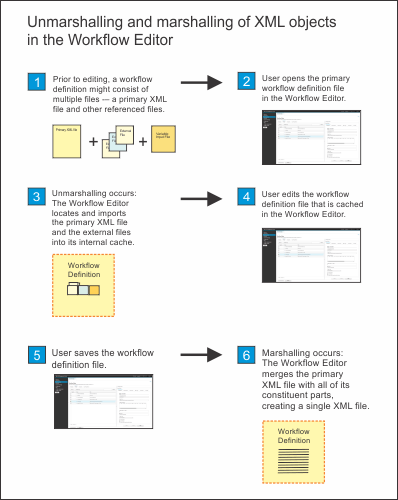
The Workflow Editor uses a process that is called unmarshalling to extract the contents of these files into its cache. Later, when you save the edited file, the Workflow Editor uses a process that is called marshalling to create a single, consolidated workflow definition file that represents all of the requisite files. The resulting object is functionally equivalent to the original workflow structure, and the references to external files are removed.
What a workflow definition is
A workflow definition might consist of just a single XML file, or it might consist of a primary XML file that refers to one or more subordinate XML files and XML fragments. You might, for example, use a modular approach and create a separate XML file to contain the variable definitions for a workflow. Further, a workflow definition might include other types of external files, such as executable code, translated text files, and velocity template files.
Collectively, this set of files comprises a workflow definition.
More about unmarshalling and marshalling
When you open a workflow definition file for editing, the Workflow Editor imports the file and its constituent parts (the external files it references) into an internal cache. The Workflow Editor validates the XML files for compliance with the schema that is supplied with the Workflows task. The schema defines the required and optional properties (XML elements and attributes) of a workflow and imposes constraints on the order in which the elements are specified, and on the values that can be specified for each element and attribute.
The Workflow Editor then performs a number of actions to ensure that you always edit the complete set of files as a single workflow definition file. Internally, the Workflow Editor creates copies of the primary XML file and all of the external referenced XML files and merges the copies into a consolidated XML object. This process, which is referred to as unmarshalling, removes the file references from the primary XML file. This action logically "breaks" the connection between the workflow definition and the external referenced XML files.
The unmarshalling process creates a single workflow definition file as output. Thereafter, whenever the user saves changes in the editing session, the changes are applied to the cached version of the workflow definition file. The original XML files are not changed by your actions in the Workflow Editor.
Later, when you save the edited file, the Workflow Editor uses a process that is called marshalling to create a single, consolidated workflow definition file that represents all of the requisite files.
For example, if the workflow definition file includes a reference to a variables XML file, the Workflow Editor automatically locates and imports the file into the cache. The Workflow Editor extracts the variable values from the XML file and merges the values with the workflow definition. These values are applied to your editing session, and are reflected in the Variables tab of the Workflow Editor. Any subsequent changes that you make to the variable values are not written back to the original variable XML file.
Note that any comments in the existing workflow definition are not preserved when you open a workflow definition in the Workflow Editor.
Figure 1 depicts the flow of events that occur when you open a workflow definition for editing in the Workflow Editor interface.