White Paper
This table shows how the parameters are mapped between the white paper published in 2003, Policy Agent’s PolicyAction statement, and the QoS Traffic Shaping Level Panel.
| Parameter | Traffic Shaping Level Panel | Panel Field |
|---|---|---|
| MaxConnections | TCP Only Settings | Connection Limit |
| MinRate | TCP Only Settings | Minimum throughput |
| MaxRate | TCP Only Settings | Maximum throughput |
| DiffServInProfileRate | Advanced Shaping | Profile rate |
| DiffServInProfileTokenBucket | Advanced Shaping | Token bucket size |
| DiffServInProfilePeakRate | Advanced Shaping | Profile peak rate |
| DiffServMaxPacketSize | Advanced Shaping | Profile maximum packet size |
| DiffServExcessTrafficTreatment | Advanced Shaping | Specify action when traffic exceeds policy thresholds |
| DiffServOutProfileTransmittedTOSByte | Advanced Shaping | Send packets, but with the following lower priority |
An Explanation of Quality of Service Enforcement Functions in CS for z/OS
This note explains several networking Quality of Service (QoS) functions available in Communication Server for z/OS® through release V1R4. It focuses on functions implemented in the Policy Agent to influence TCP connections, TCP throughput, and Token Bucket traffic policing. The Policy Agent has other functions beyond the scope of the note. For a complete description of the Policy Agent's functions, Policy Agent's policy from configuration file, and Policy Agent's policy from LDAP (Lightweight Directory Access Protocol), please refer to the z/OS Communication Server: IP Configuration Guide and z/OS Communication Servers: IP Configuration Reference for your release z/OS.
TCP Connections
The parameter MaxConnections (a parameter in the PolicyAction statement of the Policy Agent configuration file; the LDAP equivalent is ibm-MaxConnections attribute) is used to control the number of concurrently active TCP connections. For example, suppose an administrator needs to limit the number of web connections to n (N>0) during working hours. When a web connection request (i.e., an incoming TCP SYN segment) arrives and the CS TCP/IP stack is about to acknowledge the connection request, it will consult the policy component before replying. If there are fewer than N web connections active at the time, the policy component will instruct TCP/IP to accept the request, whereupon the TCP/IP stack acknowledges the connection request by sending a TCP SYN-ACK response. . If there are already N web connections active at the time, the policy component will instruct TCP/IP to reject this connection request. As a result, TCP/IP stack will send back to the client a TCP RESET segment (reject).
Limiting the number of connections active at a given time gives administrator an option to control both the CPU and the bandwidth consumed by an application workload.
TCP Throughput
The parameters MaxRate and MinRate (the respective LDAP equivalents are ibm-MaxRate and ibm-MinRate attributes) can be used to set either the maximum and/or minimum throughput limit for a given TCP connection. Let's first review how TCP throughput is determined by examining the standard-based TCP's congestion control algorithm:
TCP, on the sender side, maintains a congestion window (cwnd) count of the number of bytes which can be sent within one round-trip time. This congestion window is used to react to the network load when TCP has data to send. Cwnd is decreased whenever TCP detects a loss or a timeout, indicating that the network is congested. Cwnd is increased when no loss or timeout occurs. The amount of the increase is a multiple of the connection's segment size, and depends on whether TCP is in a slow-start phase or the recovery phase. (Slow start occurs is when the connection is first becomes active; recovery occurs is after TCP detects a loss or a timeout). In slow-start, TCP will double the cwnd amount every round-trip time. In recovery TCP increases the cwnd by only one maximum segment's worth of data per round-trip time. Note that segment size is controlled in part by the path's maximum MTU size. For example, if TCP is in slow-start and cwnd is currently at 4 (4 segments worth of bytes), meaning TCP can have 4 segments outstanding while waiting for acknowledgment, which arrives after one round-trip time. When the acknowledgment arrives, cwnd doubles, that is, it increases to is now 8. If TCP is in recovery, cwnd is incremented by one segment size, that is, it would only be 5 after one round-trip time. TCP constantly monitors the round-trip delay, which determines the value of TCP's retransmit timer. The retransmit timer is used to monitor for timeout, that is, to monitor the maximum amount of time that TCP waits to receive acknowledgment that the data sent has been received by the opposite end of the connection.
Enforcing a limit on TCP throughput is achieved by controlling the value of cwnd, i.e., controlling how much data TCP can send per round-trip time. Note that the minimum value of cwnd is 1, so there is a limit on the minimum throughput that can be enforced without dropping or delaying data, either of which introduces additional overhead. MaxRate and MinRate will be converted to max cwnd and min cwnd based on TCP's round-trip time. (Note: max cwnd is MaxRate times round-trip delay, rounded up to an integer number of segments.).
Limiting TCP's throughput allows the administrator to control bandwidth to be used by an I/O- bound connections (e.g., such as bulk data transfer applications like FTP). This prevents such a connection type from using bandwidth needed by other more interactive applications that require increased bandwidth when demand increases. Enforcing throughput together with limiting connection counts can be very effective in controlling bounds on CPU and bandwidth usage.
Token Bucket Traffic Policing
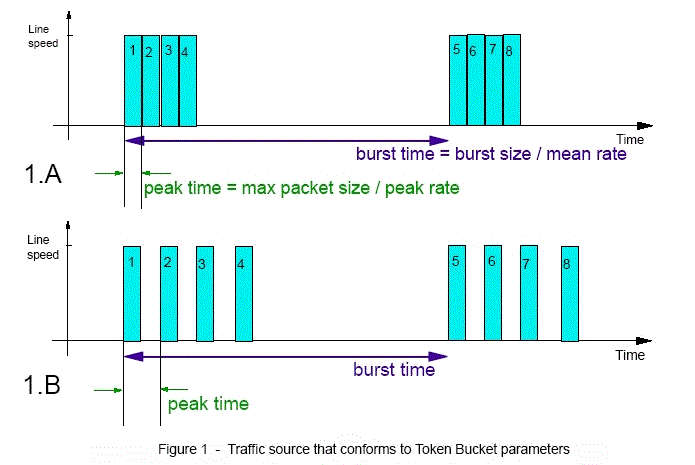
The following parameters are used to specify the Token Bucket (TB) traffic policing mechanism: DiffServInProfileRate, DiffServMaxPacketSize, DiffServInProfilePeakRate, DiffServInProfileTokenBucket, DiffServOutProfileTransmittedTOSByte, and DiffServExcessTrafficTreatment. But before going further, let's go through an example to get an understanding of the function and the relationship of the main TB parameters to each other, namely the mean rate m (also known as "in-profile rate"), the peak rate p (also known as "in-profile peak rate"), the burst size b (also known as "in-profile token bucket"), and the maximum packet size s. Let's assume that a traffic source from an application sends traffic that has the following characteristics:
- each packet has a size s,
- the mean rate is m, which is one fourth (1/4) of the link speed/capacity,
- its burst size is 4 packets, and
- the peak rate at which it sends traffic is equal to the link speed.
The following figure 1.A shows how traffic would appear on the line (i.e., would be seen by a LAN traffic analyzer). Notice that in every burst interval (b/m), there are 4 packets sent back-to-back, because the peak rate — which is the time interval between packet (s/p) — is equal to that of the link speed. Now, in figure 1.B, every thing is the same except for the peak rate, which is now one half (1/2) of the link speed. Now, there is a gap in between packets on the line since the peak time now is twice (half the speed of) the time to transmit a packet on the line.
As illustrated here, peak rate and max packet size control the interval between packets, whereas mean rate controls the interval between bursts. (Note that some applications may send packets that are smaller than the value of link divided by path MTU.)
Certain applications such as VoIP (Voice Over IP) require stringent delay and delay variations between packets. Other applications such as bulk or web traffic tend to have requirements in terms of throughput and response time, which can be controlled by adjusting mean rate or TCP throughput as discussed in earlier section. There is currently no application on z/OS that requires stringent inter-packet delay. As a result, it is not necessary that peak rate and max packet size be used with the TB traffic policing function in z/OS.
The mean rate and burst size together can be effective in to controlling aggregated bandwidth used by an application. Note that this is different from than the parameters MaxRate and Minrate used to control TCP connection throughput on a per-connection basis. Therefore, if an administrator wants to control the total bandwidth used by an application for all its connections, TB with mean rate and burst size can be employed. So, if the mean rate is 1 Mbps and there are two connections active at a time, each will obtain get approximately half of 1Mbps bandwidth. If only one is active, it can use the entire bandwidth of 1 Mbps. Burst size is used to control how many packets can be sent at a time. It is used to prevent excessive queue build-up at the local transmission queue or in the network. It is quite typical for burst size to be 1 or 2 second's worth of data with respect to mean rate.
When traffic exceeds the burst size and/or mean rate, TB traffic enforcement offers two options to control this excess traffic (via DiffServExcessTrafficTreatment parameter): one is to send the traffic at a lower-priority ToS/DSCP 1 setting ( via DiffServOutProfileTransmittedTOSByte parameter); the other is to drop or to simulate the drop of the connection. The implementation in CS for z/OS for TCP does not actually drop the traffic but rather it simulates the drop to avoid costly retransmission. The simulation is done based on the behavior of the TCP congestion window mechanism, where a drop results in cutting TCP throughput (cwnd over round-trip delay) by half. Thus, when a packet violates TB's traffic parameters, the packet is sent, but TCP's throughput will immediately be reduced without waiting for a round-trip time to actually take effect. (Note: It normally takes one round-trip delay for TCP to realize a packet has been lost based on TCP-ACK segment from the receiving end.).
-------------------------------------------------------------------------------------------------------------------------------------------------------------------------------------------------
1 Many routers/switches are configured to override the ToS/DSCP values set by hosts. z/OS Policy Agent and network administrators must coordinate with each other to make use of ToS/DSCP in order to ensure consistency and effectiveness of end-to-end QoS.