Adding a card layout

Use a card layout to display text-based information about a series of objects and make viewing and comparing multiple objects easy. It can also be used to add parent and child objects and select objects to work on.

About this task

Card layouts are valid in Creation, Task, and Admin Views.

A card layout shows related objects in boxes and supports actions. It is suited, for example, for displaying related regulations or parent business entities.

Use a card layout when only a few objects, for example, less than five, are expected to be displayed. Use a grid layout if you expect numerous objects to be displayed.

The Fields property controls the fields that are displayed in the relationship field. You can control what field the information is sorted by and the sort order.

If you choose an actor field in Sort By, the values are sorted by username (not first name and last name). The sort is case-sensitive.

In the following example, a business entity is open and each card shows a child business entity.
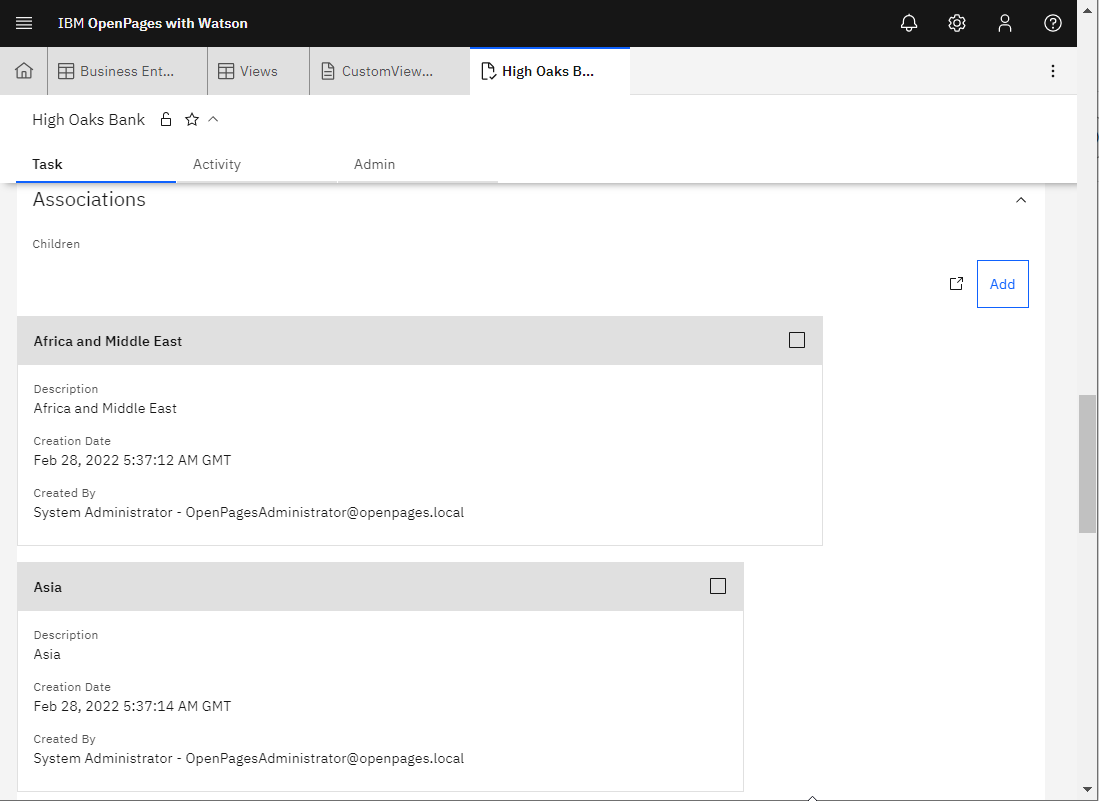
Figure 1. Example of a card layout
Business entity card showing children

On the JSON tab, a card layout is defined with type as relationship and subDisplayType as card.

Procedure

  1. In the View Designer, click the Design tab.
    The palette is displayed.
  2. Drag a Card element from the palette and add it to a section.
  3. Enter a Label. It displays as a field header within a section. Click Edit to enter localized values.
    If it is displayed, click Auto Translate icon to populate translated values to languages. For more information, see IBM Watson Language Translator.
  4. Choose an option in Relationship Type:
    • Children
    • Parents
    • Descendants
    • Ancestors
    • Siblings
  5. Choose an Object Type (displays for all relationship types except siblings). The objects that are listed vary depending on what you chose in Relationship Type.
  6. Choose a Parent Object Type and a Sibling Object Type (displays only if Relationship Type is Siblings).
  7. Complete the remaining fields. The fields that are listed vary depending on what you chose in Relationship Type.
  8. Select a Public Filter, if one exists for the object type (optional).
  9. Click Add Action to display an action button in the card (displays only if Relationship Type is Children or Parents).
    If Relationship Type is Children, you can add the following types of actions:
    • Add
    • Copy Recursive
    • Delete
    • New
    • Watson™ Suggestions

    If Relationship Type is Parents, you can add the following types of actions:

    • Add
    • Set Primary Parent
    • Watson Suggestions

    For information about actions, see Adding actions to relationship fields.

  10. Choose a Relationship Paths (displays only if Relationship Type is Ancestors or Descendants).
  11. Add Fields to the relationship field.
  12. Choose a field in Sort By.
  13. Define the Sort Direction.
  14. Add rules to the relationship field (optional). For information, see Adding rules to relationship fields.
  15. Click Done.

What to do next

Place the card in a tab group (optional). For more information, see Organizing relationship fields in tab groups.