A business object is a structure that consists of data, the action to be performed on the data, and additional instructions, if any, for processing the data. IBM® WebSphere® Adapter for JDBC uses business objects to represent tables and views in the database as well as the results of database queries, stored procedures, and stored functions. Business objects can also create a hierarchy of objects from your database and group unrelated tables. Your component communicates with the adapter using business objects.
How the adapter uses business objects
An integrated application uses business objects to access a database. The adapter converts the business objects in outbound requests into JDBC API calls to access the database. For inbound events, the adapter converts the data in the events into business objects, which are returned to the application.
- Tables and views
- Synonyms and nicknames
- Stored procedures and stored functions
- Batch SQL business objects, which represent a series of user-defined insert, update, and delete statements.
- Query business objects, which represent a user-defined SQL query to run against the database.
- Wrapper business objects, which allow you group unrelated table and view objects into a single business object, and multiple stored procedures into a single business object.
- Container business object, which contains the output from a RetrieveAll operation.
- ExistsResult business object, which contains the output from an
Exists operation.

How data is represented in business objects
For table or view business objects
Each column in the table or view is represented by a simple attribute of the table or view business object. A simple attribute is an attribute that represents a single value, such as a String, Integer, or Date. Other attributes represent a child business object or an array of child business objects.
- The database table can have more columns than the corresponding business object has simple attributes; that is, some columns in the database are not represented in the business object. Only those columns needed for your application's processing of the business object must be included in your design.
- The business object can have more simple attributes than the corresponding database table has columns; that is, some attributes in the business object are not represented in the database. The attributes that do not have a representation in the database either have no application-specific information, are set with default values, or are parameters for stored procedures or stored functions.
- The business object can represent a view that spans multiple database tables. The adapter can use such a business object when processing events triggered by changes to the database, such as Create, Update, and Delete operations. When processing business object requests, however, the adapter can use such a business object only for Retrieve and RetrieveAll requests.
A table business object always has a primary key, even if the corresponding database table does not have a primary key. The adapter uses the column specified in the primary key attribute when it retrieves table business objects. If you have defined foreign key reference in the database, the adapter automatically discovers and displays the parent-child relationship between the tables. For example, consider tables CUSTOMER and ADDRESS, where CUSTOMER is the parent table and ADDRESS is the child table. If you have defined a foreign key reference from ADDRESS to CUSTOMER in the database, the adapter automatically discovers the parent-child relationship displays the foreign key reference in the Specify the Configuration Properties for 'object' window. If the foreign key reference is from CUSTOMER to ADDRESS, the adapter automatically selects the Single cardinality check box and displays the foreign key reference. If there are multiple foreign key references defined for a table, the adapter generates only one foreign key relationship.

Table and view business objects support the Create, Update, Delete, Retrieve, RetrieveAll, Exists, and ApplyChanges outbound operations. When running an Exists operation on a hierarchical table business object, only the top-level business object is queried.


For stored procedure and stored function business objects
In a business object for a stored procedure or stored function, all the input and output parameters for the stored procedure or stored function have corresponding attributes in the business object. If any of the input or output parameters is of a complex type, such as an array or structure, then the corresponding business object attribute is a child business object type with the child business object containing the attributes of the array or structure. If the stored procedure returns a result set, a child business object is created that contains the attributes of the returned result set.
The business object for stored procedures and stored functions supports the Execute outbound operation.
The sample file below shows the structure of stored procedure business objects. The business objects, ScottStrtValues and ScottStrtValuesStrt, are generated from a stored procedure that has one input type and two output types. One of the output parameters is of the Struct data type. The external service wizard generates a business object, ScottStrtValuesStrt, for the Struct type and adds it as a child object to the parent business object, ScottStrtValues. For the attribute of type Struct in the parent business object, the ChildBOType application-specific information is set to Struct to indicate it is of type Struct. The ChildBOTypeName application-specific information is set to the value of the user-defined Struct type in the database. The following examples show the schema for the stored procedure.
Example of ScottStrtValues business object
<?xml version="1.0" encoding="UTF-8" ?>
<schema xmlns="http://www.w3.org/2001/XMLSchema" targetNamespace=

"http://www.ibm.com/xmlns/prod/websphere/j2ca/jdbc/scottstrtvalues" xmlns:scottstrtvalues=

"http://www.ibm.com/xmlns/prod/websphere/j2ca/jdbc/scottstrtvalues" xmlns:jdbcasi=

"http://www.ibm.com/xmlns/prod/websphere/j2ca/jdbc/metadata" xmlns:scottstrtvaluesstrt=

"http://www.ibm.com/xmlns/prod/websphere/j2ca/jdbc/scottstrtvaluesstrt">
<import namespace=
"http://www.ibm.com/xmlns/prod/websphere/j2ca/jdbc/scottstrtvaluesstrt"

schemaLocation="ScottStrtvaluesStrt.xsd"/>
<import namespace="http://www.ibm.com/xmlns/prod/websphere/j2ca/jdbc/metadata"

schemaLocation="JDBCASI.xsd"/>

<annotation>
<appinfo source="commonj.connector.asi">
<asi:annotationSet xmlns:asi="commonj.connector.asi" asiNSURI=

"http://www.ibm.com/xmlns/prod/websphere/j2ca/jdbc/metadata"/>
</appinfo>
</annotation>
<complexType name="ScottStrtvalues">
<annotation>
<appinfo source="http://www.ibm.com/xmlns/prod/websphere/j2ca/jdbc/metadata">
<jdbcasi:JDBCBusinessObjectTypeMetadata xmlns:jdbcasi=

"http://www.ibm.com/xmlns/prod/websphere/j2ca/jdbc/metadata">
<jdbcasi:SPName>SCOTT.STRTVALUES</jdbcasi:SPName>
<jdbcasi:MaxNumOfRetRS>0</jdbcasi:MaxNumOfRetRS>
<jdbcasi:ResultSet>false</jdbcasi:ResultSet>
</jdbcasi:JDBCBusinessObjectTypeMetadata>
</appinfo>
</annotation>
<sequence minOccurs="1" maxOccurs="1">
<element name="pkey" type="int" minOccurs="0" maxOccurs="1">
<annotation>
<appinfo source="http://www.ibm.com/xmlns/prod/websphere/j2ca/jdbc/metadata">
<jdbcasi:JDBCAttributeTypeMetadata xmlns:jdbcasi=

"http://www.ibm.com/xmlns/prod/websphere/j2ca/jdbc/metadata">
<jdbcasi:SPParameterType>IP</jdbcasi:SPParameterType>
</jdbcasi:JDBCAttributeTypeMetadata>
</appinfo>
</annotation>
</element>
<element name="fname" type="string" minOccurs="0" maxOccurs="1">
<annotation>
<appinfo source="http://www.ibm.com/xmlns/prod/websphere/j2ca/jdbc/metadata">
<jdbcasi:JDBCAttributeTypeMetadata xmlns:jdbcasi=

"http://www.ibm.com/xmlns/prod/websphere/j2ca/jdbc/metadata">
<jdbcasi:SPParameterType>OP</jdbcasi:SPParameterType>
</jdbcasi:JDBCAttributeTypeMetadata>
</appinfo>
</annotation>
</element>
<element name="strt" type="scottstrtvaluesstrt:ScottStrtvaluesStrt"

minOccurs="0" maxOccurs="1">
<annotation>
<appinfo source="http://www.ibm.com/xmlns/prod/websphere/j2ca/jdbc/metadata">
<jdbcasi:JDBCAttributeTypeMetadata xmlns:jdbcasi=

"http://www.ibm.com/xmlns/prod/websphere/j2ca/jdbc/metadata">
<jdbcasi:SPParameterType>OP</jdbcasi:SPParameterType>
<jdbcasi:ChildBOType>STRUCT</jdbcasi:ChildBOType>
<jdbcasi:ChildBOTypeName>STRUCT1</jdbcasi:ChildBOTypeName>
</jdbcasi:JDBCAttributeTypeMetadata>
</appinfo>
</annotation>
</element>
</sequence>
</complexType>
</schema>
Example of ScottStrtValuesStrt business object
<?xml version="1.0" encoding="UTF-8" ?>
<schema xmlns="http://www.w3.org/2001/XMLSchema" targetNamespace=

"http://www.ibm.com/xmlns/prod/websphere/j2ca/jdbc/scottstrtvaluesstrt" xmlns:scottstrtvaluesstrt=

"http://www.ibm.com/xmlns/prod/websphere/j2ca/jdbc/scottstrtvaluesstrt" xmlns:jdbcasi=

"http://www.ibm.com/xmlns/prod/websphere/j2ca/jdbc/metadata">
<import namespace="http://www.ibm.com/xmlns/prod/websphere/j2ca/jdbc/metadata"

schemaLocation="JDBCASI.xsd"/>

<annotation>
<appinfo source="commonj.connector.asi">
<asi:annotationSet xmlns:asi="commonj.connector.asi" asiNSURI=

"http://www.ibm.com/xmlns/prod/websphere/j2ca/jdbc/metadata"/>
</appinfo>
</annotation>
<complexType name="ScottStrtvaluesStrt">
<annotation>
<appinfo source="http://www.ibm.com/xmlns/prod/websphere/j2ca/jdbc/metadata">
<jdbcasi:JDBCBusinessObjectTypeMetadata xmlns:jdbcasi=

"http://www.ibm.com/xmlns/prod/websphere/j2ca/jdbc/metadata">
<jdbcasi:SPName>SCOTT.STRTVALUES</jdbcasi:SPName>
</jdbcasi:JDBCBusinessObjectTypeMetadata>
</appinfo>
</annotation>
<sequence minOccurs="1" maxOccurs="1">
<element name="name" type="string" minOccurs="0" maxOccurs="1">
<annotation>
<appinfo source="http://www.ibm.com/xmlns/prod/websphere/j2ca/jdbc/metadata">
<jdbcasi:JDBCAttributeTypeMetadata xmlns:jdbcasi=

"http://www.ibm.com/xmlns/prod/websphere/j2ca/jdbc/metadata">
<jdbcasi:SPParameterType></jdbcasi:SPParameterType>
</jdbcasi:JDBCAttributeTypeMetadata>
</appinfo>
</annotation>
</element>
<element name="title" type="string" minOccurs="0" maxOccurs="1">
<annotation>
<appinfo source="http://www.ibm.com/xmlns/prod/websphere/j2ca/jdbc/metadata">
<jdbcasi:JDBCAttributeTypeMetadata xmlns:jdbcasi=

"http://www.ibm.com/xmlns/prod/websphere/j2ca/jdbc/metadata">
<jdbcasi:SPParameterType></jdbcasi:SPParameterType>
</jdbcasi:JDBCAttributeTypeMetadata>
</appinfo>
</annotation>
</element>
<element name="dept_num" type="int" minOccurs="0" maxOccurs="1">
<annotation>
<appinfo source="http://www.ibm.com/xmlns/prod/websphere/j2ca/jdbc/metadata">
<jdbcasi:JDBCAttributeTypeMetadata xmlns:jdbcasi=

"http://www.ibm.com/xmlns/prod/websphere/j2ca/jdbc/metadata">
<jdbcasi:SPParameterType></jdbcasi:SPParameterType>
</jdbcasi:JDBCAttributeTypeMetadata>
</appinfo>
</annotation>
</element>
</sequence>
</complexType>
</schema>
For query business objects
A business object for a database query defines the SQL statement that performs the query and the parameters that the query requires. The query business object supports the RetrieveAll outbound operation.
As an example, assume a query business object to run the following SELECT statement:
select C.pkey, C.fname, A.city from customer C, address A
    WHERE (C.pkey = A.custid) AND (C.fname like ?)
| Business object attribute | Description |
|---|---|
| pkey | Corresponds to database column PKEY in the Customer table |
| fname | Corresponds to database column FNAME in the Customer table |
| city | Corresponds to database column CITY in the Address table |
| parameter1 | The parameter. There is one parameter for each ? (question mark) in the SELECT statement. In a SELECT statement with multiple parameters, subsequent parameters are named parameter2, parameter3, and so on. |
| jdbcwhereclause | A placeholder object for the WHERE clause |


For Oracle databases, the adapter supports complex data types such as array, table, structure, or nested structure in the query result of the business object. The adapter does not support these complex types as parameters in batch and query business objects.
For batch SQL business objects
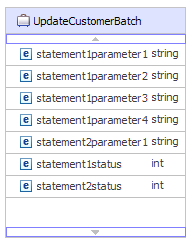
A batch SQL business object defines the INSERT, UPDATE, and DELETE SQL statements that perform the database actions and the parameters that the statements require. The batch SQL business object supports the Execute outbound operation.
As an example, assume a batch SQL business object to run the following INSERT and DELETE statements:
Insert into customer (pkey,ccode,fname,lname) values(?,?,?,?);
Delete From Customer where pkey=?

For wrapper business objects
A wrapper business object enables you to manipulate unrelated table and view business objects in a single operation. The wrapper business object supports the Create, Delete, Retrieve, and Update outbound operations.

The wrapper business object contains a simple attribute for the primary key of each child business object. The name of the field is the string "wrap", followed by the database table name and the column name of the primary key of the table. The wrapper business object also contains a complex attribute for each table business object. The name of the attribute is the table name with the string "obj" appended. The type of the complex attribute is the name of the corresponding table business object.
Business graphs
- If you need to use the outbound ApplyChanges operation
- When adding business objects to a module created with an earlier version
If business graphs exist, they are processed, but the verb is ignored for all operations except ApplyChanges.
How business objects are created
You create business objects by using the external service wizard, launched from IBM Integration Designer. The wizard connects to the database, discovers database objects, and displays them to you. You select the database objects for which you want to create business objects. For example, you specify which schemas you want to examine. In those schemas, you select tables, views, stored procedures and functions, and synonyms and nicknames. In addition, you can create additional business objects. For example, you can create a business object to represent the results of user-defined SELECT, INSERT, UPDATE, or DELETE statements that are run against the database. The wizard helps you build a hierarchy of business objects, using parent-child relationships and wrappers for unrelated business objects.
After you specify which business objects you want and define the hierarchy of those objects, the wizard then generates business objects to represent the objects that you selected. It also generates other artifacts needed by the adapter.

In some instances, the wizard cannot completely configure a parent-child relationship. For these relationships, you use the business objects editor, launched from IBM Integration Designer, to modify or complete the definition of a business object hierarchy that was created by the wizard. For more information, see the instructions for using the business object editor to modify business objects in the IBM Integration Designer information center at the following link: http://publib.boulder.ibm.com/infocenter/dmndhelp/v8r0mx/index.jsp .