Process Federation Server quick start scenario
In the quick start scenario, the federated process environment has a basic topology without any clustering and the file-based user registry is configured with only minimal security. You configure and deploy the predefined quick start pattern that provides basic configuration for development or test systems.
Topology of the quick start pattern
The following figure shows the quick start pattern topology for a development and test environment:
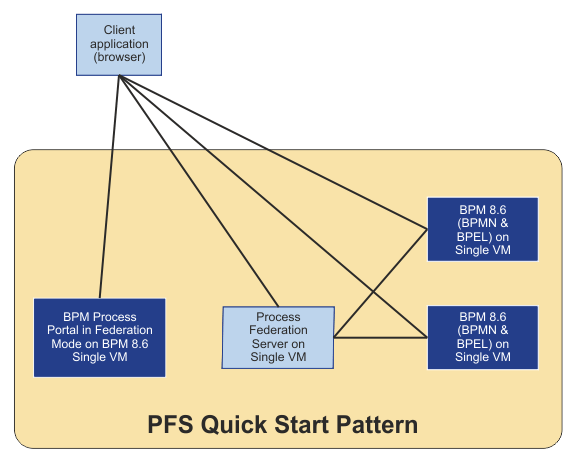
The topology of the quick start pattern includes one Process Federation Server, two federated IBM BPM systems, and one IBM BPM for federated portal configuration. Each of the Process Federation Server and the IBM BPM systems is on one virtual machine and IBM DB2® is on each virtual machine for each server. The Process Federation Server is configured with the default server.xml file and REST services.
- You must use the fully qualified domain name (FQDN) instead of an IP address to visit the federated portal. Otherwise, the single sign-on (SSO) fails to connect to any IBM BPM server or Process Federation Server from the federated portal.
- You can add the root certificate to the local trust store to avoid the pop-up window that asks
you to accept the root certificate for all the IBM BPM systems. Otherwise, you might run the risk that
your web browser, for example, Firefox, blocks the pop-up window and directly reports server
connection error.
- For Microsoft Internet Explorer or Google Chrome on Windows, import the root certificate to Trusted Root Certification Authorities in the Certificate Manager window.
- For Mozilla Firefox, import the root certificate to Authorities in the Certificate Manager window.
Federation of the quick start pattern
Business process definition (BPD) indexer and Business Process Execution Language (BPEL) indexer are enabled in parallel on both IBM BPM systems in a federated environment. In addition, three applications are installed on IBM BPM systems, which means that application A and application B are installed on one of the IBM BPM system and that application A and application C are installed on the other IBM BPM system.
Therefore, as a federated portal user, you can see a consolidated list of tasks that are related to BPD and BPEL from the IBM BPM systems in the federated environment.
Security of the quick start federated environment
In development and test environments, a file-based basic user registry is used to authenticate users across Process Federation Server, the federated IBM BPM systems, and the IBM BPM for federated portal.
In addition, SSO is enabled by using Lightweight Third Party Authentication (LTPA) key, so when users log in to the federated portal or one IBM BPM server they can access the other server that they are authorized for without getting prompted again.
Because the browser-based client application sends requests to Process Federation Server and federated IBM BPM systems, and these services are not on the system that originated the web application, cross-origin resource sharing (CORS) is used so that the browser trusts the cross-origin requests. In development and test environments, CORS is set to any portal for Process Federation Server and federated IBM BPM systems.