Content box
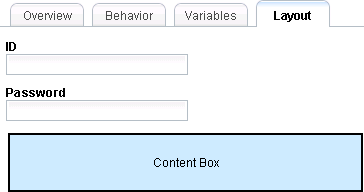
A content box is a placeholder for content that the parent coach view or coach defines.
In the parent coach or coach view, you can add content to the coach
view that contains the content box. For example, you have a coach
view for customer information and you are using this view in a credit
application coach. If you put the fields and controls for a credit
application user interface into the customer information view, it
is more difficult to reuse it. You might be limited to reusing it
in other credit application views or coaches. Instead, provide a content
box in the customer information view. In the credit application coach,
place the extra fields and controls that are needed for the credit
application into the content box. By providing a content box, the
parent coach has an area for its specific content and the customer
information view can remain generic. Because the customer information
view is generic, you can reuse the customer information view in other
views and coaches.
| Coach view | Coach that contains the coach view |
|---|---|
 |
 |
In the coach view itself, you cannot drop anything into a content box. When you open a view or coach that uses the content, you can drop palette items into the content box. Additionally, the content that you drop is specific to that instance of the view. For example, if the parent view or coach contains two instances of the view, the elements outside of the content box are the same. However, the content boxes of the two instances are independent; therefore, updating one instance does not affect the other instance. This rule applies whether the instances are in the same parent view or in different parent views.
You cannot add a content box to a coach.