Data throughput rate
Throughput rates differ for different environments because of different disk, network bandwidth, server systems, number of tapes, and configuration settings. When you are moving data, certain elements that are used in the movement of data can be tuned to improve data throughput.
Throughput rates differ widely among various environments because of different disk, network bandwidth, server systems, number of tapes, and configuration settings. The information that is provided here concentrates on selected elements that are involved in the movement of data. This information determines how to use existing resources to their maximum efficiency and provide insight as to how throughput can be improved.
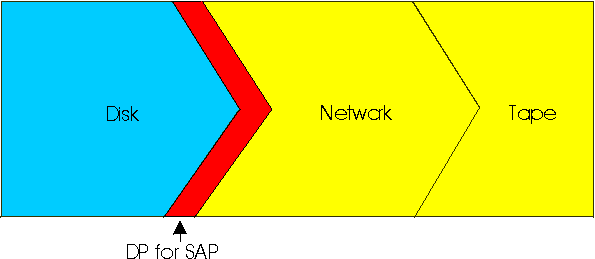
From a high-level view, the data packages must send these elements when it does a backup with Data Protection for SAP: Data is read from disk that is processed by Data Protection for SAP, and sent through the network to tape or disk storage media. If the system is not balanced, the disk I/O, network bandwidth, and storage media rates might create a bottleneck. This situation can cause other resources to remain idle. Overall data throughput is typically measured per file or per entire backup operation. The results are documented as an average throughput rate in the logfile as the average transmission rate. However, identifying bottlenecks that are derived from log file messages is difficult. For this analysis effort, Data Protection for SAP provides performance sensors that indicate a bottleneck. These bottlenecks are located either in the elements that are represented in blue (for disk) or in yellow (for network and tape respectively) in the graphic.