Uninstalling the Sandbox Operator
You can uninstall the Operator to release storage. To prevent data loss, shut down the z/OS® systems of all sandbox instances that are managed by the Operator with persistent storage.
Uninstalling the Sandbox Operator from the Red Hat OpenShift web console
To uninstall the Operator from the Red Hat® OpenShift® web console, follow these steps.
- Select the Administrator perspective.
- Click .

- Filter by entering the keyword IBM Wazi.
- Select the appropriate project or find the instance of the Operator that you want to uninstall.
Then, click the three dots at the right, and click Uninstall Operator.

The uninstallation will leave the instances of the sandbox that are running. If you want to delete those instances, take the following actions from the Administrator console.
- Click .

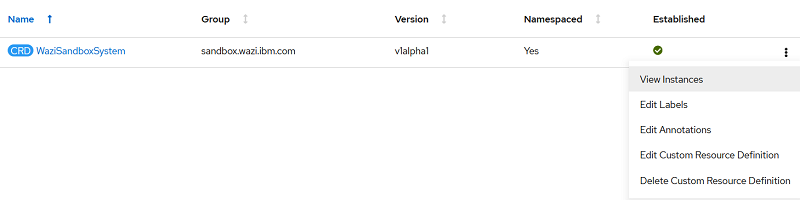
- Filter by entering the keyword wazisandbox.
- Click the three dots at the right, and select View Instances.
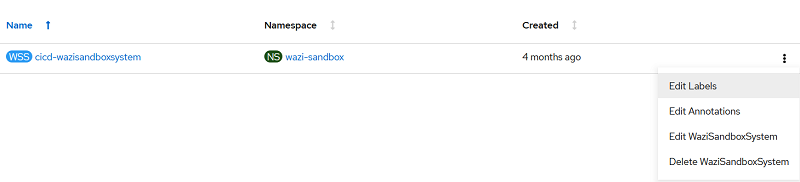
- Click the three dots, and select Delete WaziSandboxSystem.
Uninstalling the Sandbox Operator from the command-line interface
You can also manually uninstall the Operator and sandbox instances with commands.
To delete all sandbox instances in the current project, run oc delete --all
WaziSandboxSystems or the equivalent kubectl command.
To uninstall the Operator from the current project, run the following command.
oc delete subscription wazi-sandbox-operator -n <NAMESPACE>To delete the
CustomResourceDefinition cluster, run the following
command.Note: Administration privileges are required.
oc delete customresourcedefinition wazisandboxsystems.sandbox.wazi.ibm.comYou can use the
kubectl in place of oc.Note: Running the
command will not remove any Secret, ConfigMap, or
PersistentVolumeClaim that is manually created. You must remove those resources
manually.