Use the Classification Quick Start Tool and Classification Workbench to create knowledge bases and decision plans. In most cases, the development of knowledge bases and decision plans follows several basic steps. Your workflow can vary.
You can get up and running quickly with the Classification Quick Start Tool by importing sample content and creating an initial classification project. Then export the resulting knowledge base and decision plan projects into Classification Workbench for further development. Alternatively, you can import content directly into Classification Workbench to develop production-ready knowledge bases and decision plans, as described in the following sections.
Knowledge base development
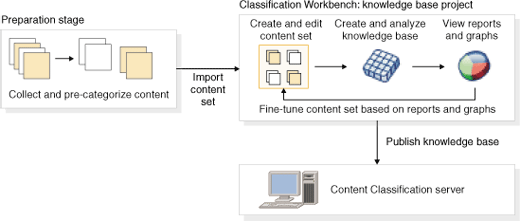
Before using Classification Workbench to create a knowledge base, you gather (and optionally pre-categorize) data that will form the basis of a content set. If necessary, you convert this data into a format that is recognized by Classification Workbench.
Then you use Classification Workbench to:
- Create a knowledge base project by importing data.
- Edit and categorize content items, as required.
- Create and analyze a knowledge base, and generate analysis results.
- Evaluate knowledge base performance by viewing reports and graphs.
- As required, improve knowledge base performance by editing the content set and retraining.
- Publish the knowledge base to the IBM® Content Classification server.
Decision plan development
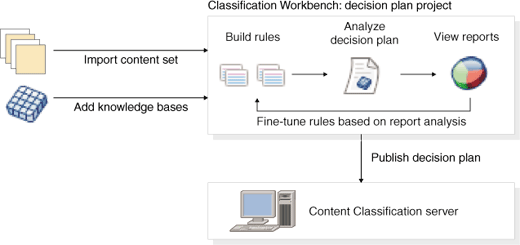
Typically, you build a decision plan for the Content Classification by following these steps:
- Create a decision plan project by importing a content set.
- Define rules triggers and actions.
- Analyze the decision plan by using the imported content set.
- View decision plan reports to check performance.
- Fine-tune rules if necessary.
After building a decision plan in Classification Workbench, you publish it to the Content Classification server along with any referenced knowledge bases.