Writing Java plug-ins

Rhapsody® plug-ins can be written in Java™.

About this task

While the steps described in this section can be carried out using any Java IDE, the text and screen captures provided demonstrate how to perform these steps in Eclipse.

To write the Java code for your plug-ins:

Procedure

  1. Create a new Java project
  2. Add theRhapsody library to the project build path
  3. Define a Java class for the plug-in
  4. Implement the required methods

Creating Java projects

To create Java projects, from the Eclipse main menu, select File > New > Project > Java Project.

Adding Rhapsody library to project build path

In order to build your Java application, you have to specify the location of the rhapsody.jar file as well as the location of the native library that is required.

Procedure

  1. In the Package Explorer View, right-click the project that you created, and then select Build Path > Configure Build Path.
  2. Go to the Libraries tab and click Add External JARs.
  3. Select rhapsody.jar, under <Rhapsody installation path>\Share\JavaAPI
  4. After rhapsody.jar has been added to the list, expand it and set the Native library location to <Rhapsody installation path>\Share\JavaAPI
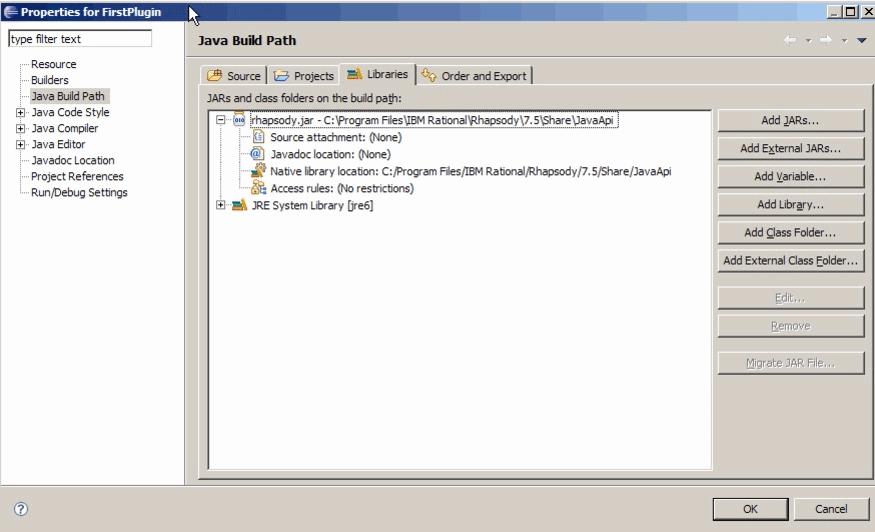
    Properties for FirstPlugin window showing Libraries tab

Defining Java class for plug-in

Procedure

  1. In the Package Explorer View, right-click the project.
  2. Select New > Class.
  3. When the New Java Class window is displayed, give the class a name, enter RPUserPlugin for the Superclass, and make sure the Inherited abstract methods check box is selected.

    Your plug-in class must implement the following methods:

    //called when the plug-in is loaded
    public abstract void RhpPluginInit(final IRPApplication rhpApp);
    //called when the plug-in's menu item under the "Tools" menu is selected
    public void RhpPluginInvokeItem();
    //called when the plug-in popup menu (if applicable) is selected
    public void OnMenuItemSelect(String menuItem);
    //called when the plug-in popup trigger (if applicable) is fired
    public void OnTrigger(String trigger);
    //called when the project is closed - if true is returned, the plug-in will be
    unloaded
    public boolean RhpPluginCleanup();
    //called when Rhapsody exits
    public void RhpPluginFinalCleanup();
    
    Note: The Java code for your plugin should never include a call to System.exit().