
Overview of testing with Ant scripts in headless IBM Integration Designer
A conceptual overview of testing with scripts is presented.
Scripts let you run tests in a batch mode independent of IBM® Integration Designer. If you have dozens or hundreds of tests to run, the tests can be scheduled at a time of low machine usage, for example, after hours when most developers are at home and machines are available for testing. Testing with scripts is ideally suited for an agile development environment which encourages nightly tests to verify a working development model.
A simple process makes creating, invoking and seeing the output from a script an easy process. In the following diagram, the process begins with creating an encrypted password. Although not necessary to run a script, if you are sharing your script and you want to keep the password confidential, then an encrypted password is recommended. A utility is provided for you to generate the encrypted password. Then you launch an Ant script, which uses the encrypted password, using a batch file or shell script. The Ant script then runs the suite of test cases and outputs an XML file listing the test results.
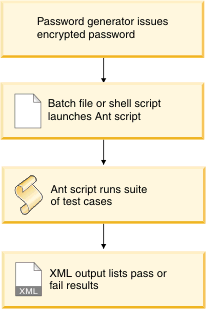
In Working with scripts you are shown this process step by step.
Testing SOA applications with IBM Integration Designer and Ant scripts also describes the testing process in detail when using scripts.