Hiring Sample Overview
The Hiring Sample is included with Workflow Center. The sample introduces the features of Process Designer by showing you how to run a sample process.
Important: Do not use this sample application to test instance migration between major
versions of the product. To test migration of instances, use your own applications and instance data
to determine if tasks, instances, and coaches will work as expected after migration.
The story: Standard HR Open New Position process
The Hiring Sample process application includes a process that is named Standard HR Open New Position, which captures the steps and decision points for submitting and processing a position request to fill a position. The process diagram is shown in the following figure:
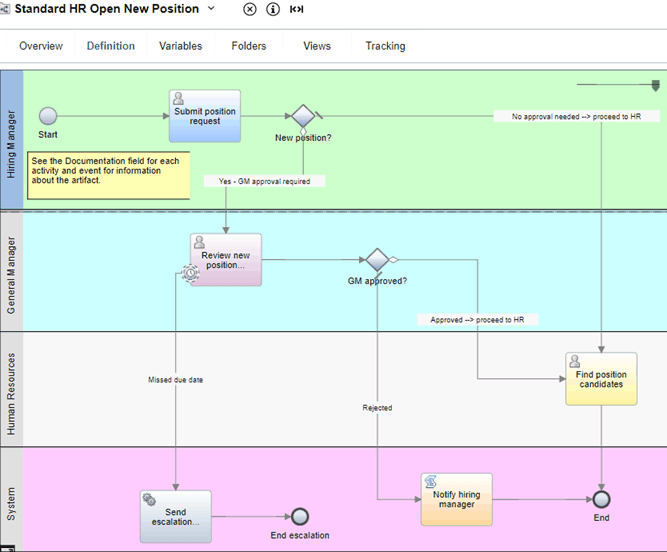
In the process diagram, the following workflows are modeled:
- The hiring manager determines the position requirements and prepares a position request for submission to the Human Resources (HR) department.
- A hiring manager submits a position request either to fill a new position or to replace a departing employee in an existing position.
- If the position request is to fill a new position, the position request is routed to the General Manager (GM) for approval. The GM evaluates the position request and either approves it or rejects it.
- If the GM approves the position request, it is routed to HR, which can then search for job candidates.
- If the GM rejects the position request, the hiring manager is notified and the position request is terminated.
- If the position request is to fill an existing position, the position request is routed directly from the hiring manager to HR, which can then search for job candidates.