Pcdata Properties - Validation Tab
A pcdata object contains character data in an XML document. Only one pcdata object can be defined per element or content particle.
Sterling Gentran:Server® automatically names the pcdata object with the name of the parent element or content particle.
When a pcdata has an operation performed against it (link, standard rule, or as an extended rule storage field), the system displays a red checkmark over the pcdata icon.
This diagram illustrates the Pcdata Properties dialog box Validation tab.
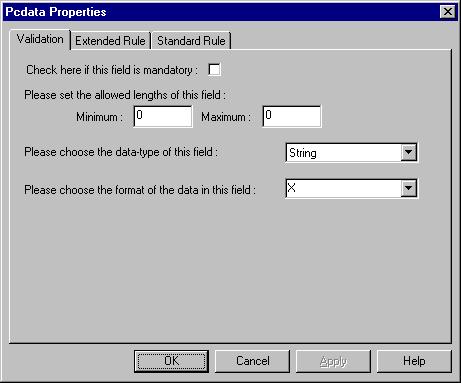
This table describes the parts of the Pcdata Properties dialog box Validation tab.
| Part | Function |
|---|---|
| Mandatory | Indicates whether the pcdata is mandatory. |
| Minimum | Specifies the minimum length of the pcdata. |
| Maximum | Specifies the maximum length of the pcdata. |
| Data-type | Specifies the type of data. Valid values are:
|
| Format | Specifies how the pcdata is formatted. Depending on which Data-type you selected, you can either select the data format from a list (if you choose Number or Date/Time in the Type field), or enter a Syntax Token to denote that this field must be formatted as the specified Syntax Token dictates. When you installed Sterling Gentran:Server, you assigned a default format to the string fields. This format serves as the basis for character validation. Most U.S. users use a default format that corresponds to ASCII characters (for example, the X syntax token). Most users of Asian or European languages and encoded character sets should use the Free Format (0x01-0xFF). |