About the XML Tutorial
The following topics contain a tutorial for the Sterling Gentran:Server® Application Integration subsystem, using XML. This tutorial includes an inbound mapping example (invoice) and an outbound mapping example (invoice).
The purpose of this tutorial is to present the general mapping process, using examples that teach you a logical approach and methods that should be used when you create your own maps.
To access reference information, see the Application Integration User Guide. For additional information on the various tasks described, refer to the IBM® Sterling Gentran:Server for Microsoft Windows User Guide.
Tutorial assumptions and scenario
The following are the assumptions for this tutorial and a description of the scenario we are utilizing.
- Your company is MWT Manufacturing Co., which manufactures a wide variety of supplies for pet stores. MWT Manufacturing Co. sells and buys pet supplies directly to and from large pet supply retail chains.
- Pet Zone, a large pet supply retailer, is the trading partner with whom your company is exchanging invoices (i.e., your company both buys and sells goods with Pet Zone).
You need to create two maps—one that enables your company to translate the invoices that you receive from Pet Zone and one that allows you to translate your application file to the invoices that you send to Pet Zone.
For inbound processing, once the invoices from Pet Zone are translated into your application file format, they can be processed through your Order Processing System, and your company can ship the goods to Pet Zone. You have an existing application file layout from your order entry department that defines the information your system needs to process the order. And, from discussions with the Pet Zone, you know the data content of the orders that your partner is sending you.
For outbound processing, after you ship an order to Pet Zone you need to translate your application file to generate the corresponding invoice to send to Pet Zone. You have an existing application file layout from your accounts payable department, that defines the information your system generates for the invoice. And from discussions with the Pet Zone, you know the requirements for the invoices that you are sending them.
Diagram: Inbound and Outbound Translation Process
This diagram illustrates the inbound and outbound translation process.
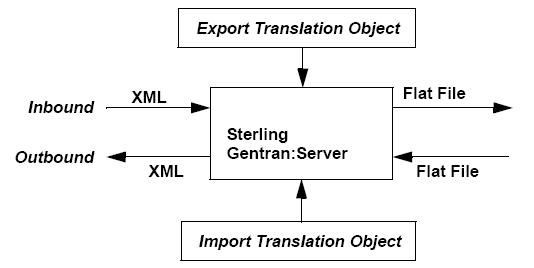
Import map
When you create an import map, you must define to Sterling Gentran:Server your flat file format and the XML format in which your partners expect to receive the documents.
Export map
When you create an export map, you need to define to Sterling Gentran:Server the XML format in which your partners sends documents and your flat file format (how the data needs to be formatted for your application to process it).
Mapping analysis
The first step in creating any map is the analysis of the mapping requirements. This is the most important step in creating a successful map. If the analysis you perform is complete, you have all the information you need to create the map in an efficient and logical manner. If you omit this critical step and proceed directly to creating the map, it is likely that creating the map is a much longer and arduous task, and the map may be invalid due to oversights and omissions.
This table describes the steps used in mapping analysis. These steps apply to translating both inbound and outbound data. For this tutorial we have done the analysis for you.
| Task | Action |
|---|---|
| 1 | Analyze your file format. |
| 2 | Analyze your partner’s file format. |
| 3 | Correlate your file and your partner’s file formats. |
| 4 | Begin creating the map. |