External Data Archive Definition Dialog Box
Use the External Data Archive Definition dialog box to create archive definitions for external data.
The following illustrates the External Data Archive Definition dialog box:
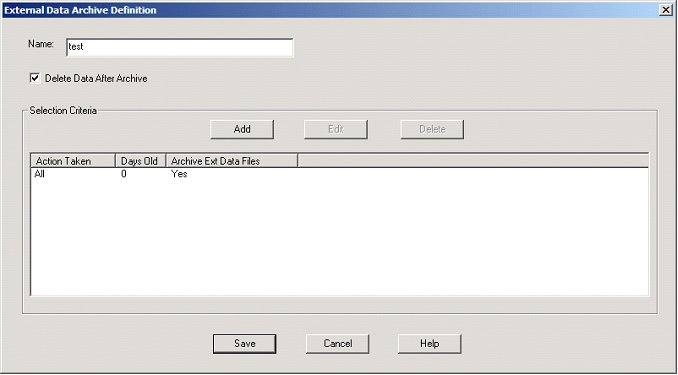
The following describes the parts of the External Data Archive Definition dialog box.
| Part | Function |
|---|---|
| Name | Specify the name of the archive definition file. Note: This
name must be unique.
|
| Delete Data After Archive | Tell the system to remove the message data after archiving it. This is selected by default. |
| Add | Accesses the External Data Selection Criteria Dialog Box and enables you to define new archive criteria. |
| Edit | Accesses the External Data Selection Criteria Dialog Box for the selected mailbox criteria and enables you to modify the archive criteria. |
| Delete | Deletes the selected external data criteria from
the system. Important: The system removes the criteria
without prompting you to confirm the deletion.
|
| Action Taken | Displays the action taken on the external data
file. Value values:
|
| Days old | Displays the age (in days) of the external data files to be archived. |
| Archive Ext Data Files | Displays the archived external data files. |