StartRFC Function
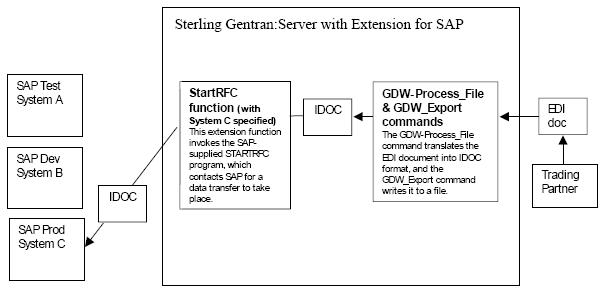
After an EDI document has been converted to an IDoc, you use the StartRFC function to call SAP’s STARTRFC program, which in turn, contacts the SAP system for data transfer to take place. The IDoc is then transferred to the SAP system.
Be sure to understand the distinction between the StartRFC function and SAP’s STARTRFC program. The Extension for SAP provides the StartRFC function to enable you to indirectly invoke SAP’s STARTRFC program. In this way, the Extension for SAP can automate the process of providing parameter values for SAP’s STARTRFC program via the StartRFC function’s connection name parameter or invoke the aleclient command provided with the Extension for SAP—if the systems are using ALE to transfer data.
Use the following syntax when entering the SAPINT.EXE program with the StartRFC function in a Sterling Gentran:Server® session:
SAPINT.EXE -STARTRFC:unc_pathname -PATH:connection nameWhere: unc_pathname is the fully-qualified filename of the file that has been converted from an EDI document to an IDoc, and that is to be transmitted to the SAP system.
connection name is used to identify a unique set of RFC parameters to be used by SAP’s STARTRFC program. This group of parameters indicates the exact SAP system to receive the IDoc. The connection name value can be found on the Extension for SAP SAP Configuration dialog box in the Connection Name box.
If the name on the RFC Parameters tab is longer than 8 characters, enclose the Connection Name value in quotation marks.
This diagram depicts the path of an EDI document from the Trading Partner through Sterling Gentran:Server to the SAP system. It shows the role the StartRFC function plays in the process of exchanging data between your SAP system and your Sterling Gentran:Server system.