System Configuration Controllers Tab
The System Configuration Controllers tab enables you to change controller settings for every controller in your system, including stopping and starting Sterling Gentran:Server® services on the controllers in your system. You can stop and start the Sterling Gentran:Server system at any time by performing a series of tasks in the correct sequence.
The Controllers tab also enables you to start and stop the Sterling Gentran:Server Poller and Sterling Gentran:Server Scheduler services.
Additionally, the Controllers tab enables you to set a limit for the number of process control events that can execute concurrently.
Stop the system before you perform network maintenance, upgrade the operating system on any machine running Sterling Gentran:Server, or maintain or reorganize your Sterling Gentran:Server database.
Parts of the Controllers Tab
The following illustrates the System Configuration Controllers tab.
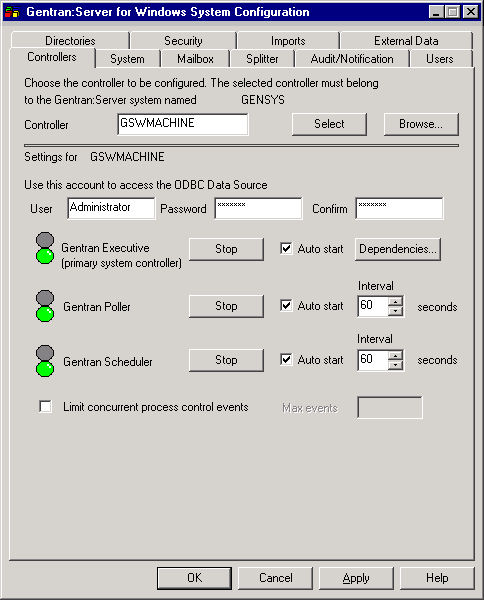
The following table describes the parts of the Controllers tab:
| Part | Function |
|---|---|
| Controller | Specify the name of the selected controller. When you launch System Configuration from a client, the controller defaults to the primary Sterling Gentran:Server system controller. |
| Select | Accesses the settings and start/stop controls for the chosen controller. |
| Browse | Displays the Choose Network Server dialog box so you can select the appropriate controller. |
| User | Specify the User ID of the Open Database Connectivity (ODBC) log on account that you want Sterling Gentran:Server Executive to use on the selected controller. |
| Password | Specify the password of the ODBC log on account that you want Sterling Gentran:Server Executive to use. |
| Confirm | Specify again the password of the ODBC log on account for confirmation. |
| Stop/Start | Stops or starts the appropriate service on the selected controller (the service listed to the left). |
| Dependencies | Enables you to select the services/load-ordering
groups that must be started prior to initiating the Sterling Gentran:Server Executive. The order that the services on which the Executive Service is dependent must be sequenced as follows:
|
| Auto start | Automatically starts the Executive Service, Poller, or Scheduler service on the selected controller when the Sterling Gentran:Server Executive starts. |
| Interval | Specify a time (in seconds) to change the interval Sterling Gentran:Server should wait between checking for polled or scheduled events. |
| Limit concurrent process control events | Limit concurrent process control events. |
| Max events | Contains the number of process control events that the system is allowed to concurrently execute. |
Dependencies
If you click Dependencies on the Controllers tab, you can specify dependencies by selecting the services/load-ordering groups that must be started prior to initiating the Sterling Gentran:Server Executive. The Sterling Gentran:Server Executive Service depends on the following installed services:
- RPC Service
- MSSQL Service
- SQL Executive Service
The following illustrates the Dependencies dialog box.
