Overview of the Click and Collect process flow
In the Click and Collect process flow, Sterling Order Management System Software creates and sources a Customer Order for in-store pickup, and JDA executes a Transfer Order to move inventory from a distribution center to the store.
The Sterling Order Management System Software system interacts with JDA through JMS queues and functions that are supplied by the integration. Use the integration properties file at <INSTALL_DIR>/properties/customer_overrides.properties to configure the supplied queues. For more information, see Defining integration properties.
The following diagram and description explain the services for the Click and Collect process flow.
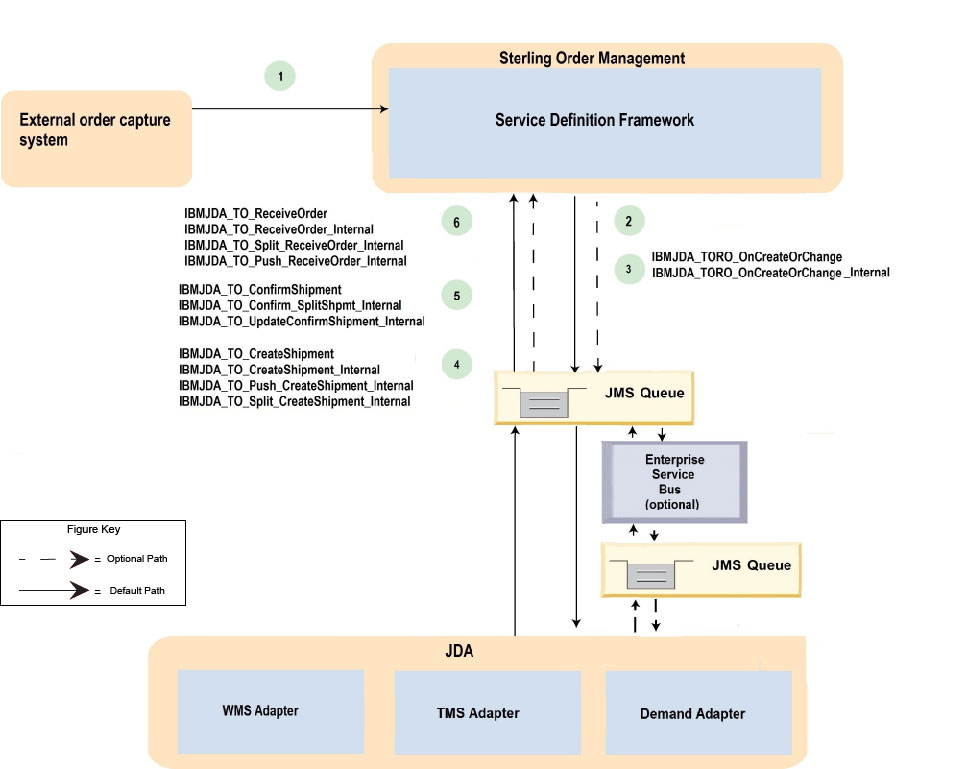
- An external system captures a customer order for in-store pickup.
- Sterling Order Management System Software creates
and sources the Customer Order. Sterling Order Management System Software
determines that in-store pickup is required and inventory must be
transferred from the distribution center to the store. Sterling Order Management System Software creates
a Transfer Order Release to transfer inventory to the warehouse and an
Order Release for in-store pickup. Note: Ensure that the Customer Order and Transfer Order in Sterling Order Management System Software include the
PackListTypeattribute. This attribute maps to the Commodity code in JDA TMS. This code is mandatory. - On Transfer Order Release, the Sterling Order Management System Software event,
ON_RELEASE_CREATION_OR_CHANGE, is invoked, which then invokes the
IBMJDA_TORO_OnCreationOrChange service and the
IBMJDA_TORO_OnCreationOrChange_Internal subservice.
The service sends a Transfer Order message to a JMS queue that is monitored by an ESB or by JDA. If the JMS queue is monitored by an ESB, the ESB transports the message to a JMS queue that is monitored by JDA. JDA fetches the message.
Within JDA, the Transfer Order message is sent to TMS as a TMS shipment and to Shipping WMS as a WMS order. The Transfer Order message contains a
Transfer Order Typeattribute, which indicates the Transfer Order is associated with a specific Customer Order that is designated for in-store pickup.The Sterling Order Management System Software and GS1 message mapping file,
ReleaseTOOrderOnCreationOrChange.xsl, is in <INSTALL_DIR>/repository/xapi/template/merged/xsl/ibmjda. - Within JDA, the load is
planned. TMS creates and tenders a load to transport the Transfer
Order shipment and sends a Carrier Move and Shipment message to the
Shipping WMS. An Expected Receipt message is sent to the receiving
store. The Expected Receipt message indicates that the Transfer Order
is designated for a Customer Order and in-store pickup. A Shipment for Transfer Order message is sent to a JMS queue that is monitored by the Sterling Order Management System Software integration server, IBMJDA_TO_CREATESHIPMENT, or by an ESB. If the JMS queue is monitored by an ESB, the ESB transports the message to a JMS queue that is monitored by IBMJDA_TO_CREATESHIPMENT. The integration server fetches the inbound message based on the message selector that is specified on the JMS message header,
targetFunctionName=TOCreateShipment. The integration server invokes the following services:- IBMJDA_TO_CreateShipment
- IBMJDA_TO_Split_CreateShipment_Internal
- IBMJDA_TO_Push_CreateShipment_Internal
- IBMJDA_TO_CreateShipment_Internal
The IBMJDA_TO_CreateShipment service can create and update multiple shipments and receipts in one GS1 message. Messages are split and pushed to interim JMS queues and processed by IBMJDA_TO_CREATESHIPMENT, based on the message selector that is specified on the JMS message header,
targetFunctionName=TOCreateShipmentInt. The Sterling Order Management System Software and GS1 message mapping file,CreateTOShipment.xsl, is in <INSTALL_DIR>/repository/xapi/template/merged/xsl/ibmjda. - The shipment departs the warehouse. Within JDA, the Shipping WMS publishes a Shipment Details message
to the receiving store that indicates the Expected Receipt details must be updated. The shipment
details, such as trailer number and container, are sent to Sterling Order Management System Software and TMS. Sterling Order Management System Software marks the Transfer Order as shipped. To send the message to Sterling Order Management System Software, JDA sends the message to a JMS queue that is monitored by the Sterling Order Management System Software integration servers, IBMJDA_TO_SHIPMENT and IBMJDA_TO_CNFSHIPMENT, or by an ESB. If the JMS queue is monitored by an ESB, the ESB transports the message to a JMS queue that is monitored by IBMJDA_TO_SHIPMENT and IBMJDA_TO_CNFSHIPMENT. IBMJDA_TO_SHIPMENT fetches the inbound message based on the message selector that is specified on the JMS message header,
targetFunctionName=TOConfirmShipment. IBMJDA_TO_CNFSHIPMENT usestargetFunctionName=TOConfirmShipmentIntto push messages internally. The integration servers invoke the following services:- IBMJDA_TO_ConfirmShipment
- IBMJDA_TO_Confirm_SplitShpmt_Internal
- IBMJDA_TO_UpdateConfirmShipment_Internal
The IBMJDA_TO_ConfirmShipment service can create and update multiple shipments and receipts in one GS1 message. Messages are split and pushed to interim JMS queues and processed by IBMJDA_TO_SHIPMENT. The Sterling Order Management System Software and GS1 message mapping file,
ConfirmTOShipment.xsl, is in <INSTALL_DIR>/repository/xapi/template/merged/xsl/ibmjda. - The receiving store receives the shipment. The shipment details are
sent to Sterling Order Management System Software.
Sterling Order Management System Software
creates a receipt against the Transfer Order shipment. To send the message to Sterling Order Management System Software, JDA sends the message to a JMS queue that is monitored by the Sterling Order Management System Software integration server, IBMJDA_TO_RECEIVEORDER, or by an ESB. If the JMS queue is monitored by an ESB, the ESB transports the message to a JMS queue that is monitored by IBMJDA_TO_RECEIVEORDER. The integration server fetches the inbound message based on the message selector that is specified on the JMS message header,
targetFunctionName=TOReceiveOrder. The integration server invokes the following services:- IBMJDA_TO_ReceiveOrder
- IBMJDA_TO_Split_ReceiveOrder_Internal
- IBMJDA_TO_Push_ReceiveOrder_Internal
- IBMJDA_TO_ReceiveOrder_Internal
The IBMJDA_TO_ReceiveOrder service can create and update multiple shipments and receipts in one GS1 message. Messages are split and pushed to interim JMS queues and processed by IBMJDA_TO_RECEIVEORDER, based on the message selector that is specified on the JMS message header,
targetFunctionName=TOReceiveOrderInt. The Sterling Order Management System Software and GS1 message mapping file,CreateTOReceipt.xsl, is in <INSTALL_DIR>/repository/xapi/template/merged/xsl/ibmjda.