SWIFTNet MEFG Server
The SWIFTNet MEFG Server serves requests and receives messages to and from SWIFTNet, through a client application and a server application that communicate with the SWIFTNet network through the InterAct or FileAct protocol. The SWIFTNet MEFG Server operates independently from the Sterling B2B Integrator and includes all the APIs necessary to communicate with the SWIFTNet network.
Sterling B2B Integrator enables you to use either InterAct or FileAct messaging with a store-and-forward option. The benefits of using store-and-forward include:
- The sender and receiver do not need to be online at the same time, as is required for real-time messaging.
- The sender is notified in the event delivery fails (and can optionally be notified upon delivery of the message).
Sterling B2B Integrator also has a feature that provides you with failover support from real-time messages to store-and-forward (if there is a failure in real-time messaging, you can configure the Sterling B2B Integrator to automatically switch to store-and-forward messaging to increase your messaging success).
The SWIFTNet client application sends requests to the SWIFTNet network through the SWIFTNet Alliance Gateway/SWIFTNet Net Link (SAG/SNL) instance. The client application listens for requests from the SWIFTNet Client service, and interacts with SWIFTNet to obtain responses.
The SWIFTNet MEFG Server application receives requests from SWIFTNet. The server application listens for requests from SWIFTNet and interacts with the Sterling B2B Integrator to obtain responses. A request from the server application to the Sterling B2B Integrator calls the SWIFTNet Server adapter to process the request.
The SWIFTNet MEFG Server application is started by enabling (and stopped by disabling) the SWIFTNet Server adapter. The starting and stopping of the server application is handled through the Command Line Adapter 2, which is built into the SWIFTNet Server adapter.
This diagram illustrates the process flow between the Sterling B2B Integrator and the SWIFTNet network through the SWIFTNet MEFG Server:

The administration of the SWIFTNet MEFG Server is through SWIFTNet Server adapter, including enabling and disabling the SWIFTNet MEFG Server.
If you use the SWIFTNet HTTP Server adapter in conjunction with the SWIFTNet Server adapter to use Secure Sockets Layer (SSL), the SWIFTNet HTTP Server adapter accepts the forwarded request from the SWIFTNet MEFG Server and provides secure authentication.
The SWIFTNet Client service (in conjunction with the SWIFTNet HTTP Server adapter) enables you to use Secure Sockets Layer (SSL) to provide secure authentication, using the SWIFTNet HTTP Server adapter to accept the forwarded request from the SWIFTNet MEFG Server. When you use SSL with the Sterling B2B Integrator, two channels are secured: an Outbound channel (the Sterling B2B Integrator acting as the Requestor) and an Inbound channel (the Sterling B2B Integrator acting as the Responder).
This diagram illustrates the process flow between the Sterling B2B Integrator and the SWIFTNet network through the SWIFTNet MEFG Server, including the Outbound and Inbound channels (using the SWIFTNet HTTP Server adapter for SSL):
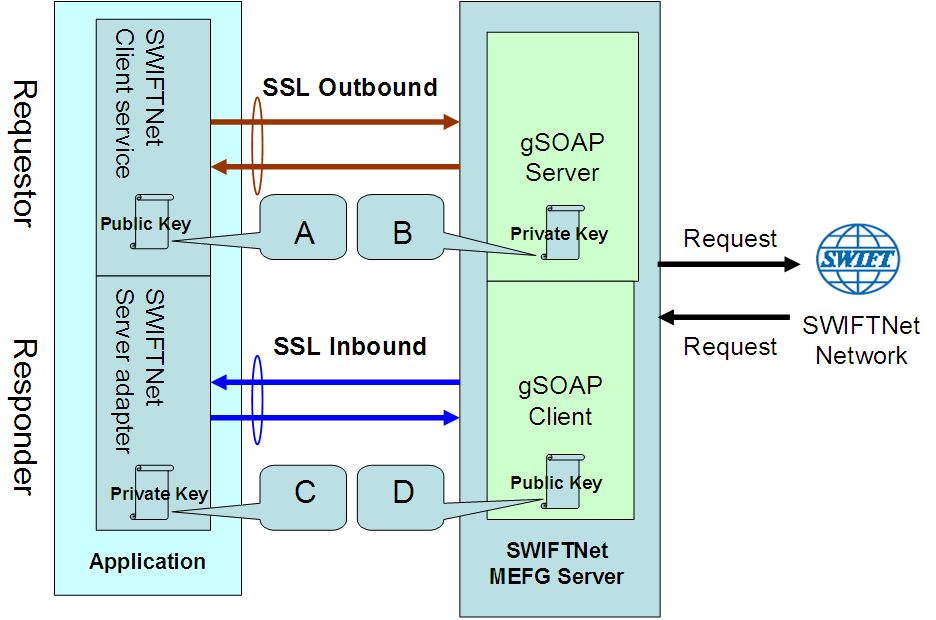
You will need 2 pairs of certificates. The first pair belongs to the SWIFTNet MEFG Server (A and B in the diagram above) and is used to secure the outbound channel. The second pair of certificates belongs to the Sterling B2B Integrator (C and D in the diagram above) and is used to secure the inbound channel. In the above diagram, the callouts signify the following:
- A — A public key certificate file belongs to the SWIFTNet MEFG Server that is configured on the SWIFTNet Client service (the certificate is specified for the CA Certificate parameter).
- B — A private key certificate file that is stored on the SWIFTNet MEFG Server as a key file (which you configure through the SSL Configuration utility named sslUtil.jar in the SWIFTNet MEFG Server installation bin sub-directory).
- C — A private key certificate file that is configured on the SWIFTNet HTTP Server adapter (the certificate is specified for the System Cert parameter).
- D — A public key file that belongs to the Sterling B2B Integrator and is stored for the SWIFTNet MEFG Server as a CA Cert file or trusted list (that you configure through the SSL Configuration utility named sslUtil.jar in the SWIFTNet MEFG Server installation bin sub-directory).
Supported Platforms
The following platforms are supported for the SWIFTNet MEFG Server:
- Windows Server 2003 (Standard or Enterprise Edition) with Service Pack 1
- AIX® 5.3 ML02
- SunOS 5.10