Terms used in Marketing Operations OnDemand
Marketing Operations OnDemand is a system of record and a collaboration tool. Within Marketing Operations OnDemand, you can use projects as containers where individuals and groups can organize their work. You can use campaigns, programs, and plans to organize projects and allocate project funds for up to a year.
Projects
Projects can contain any of the following elements:
- Review areas where team members can comment on, collaborate on, and approve creative items such as images, text, audio, and video
- Discussion areas where team members can talk about and track important issues for a project in a shared location
- Libraries to store important documents and files for the project
- Schedules where you can assign and manage tasks and manage time allocation
- Budgets to manage your expenses
As a project manager, you determine which of these elements to include in your projects.
Campaigns
A campaign is a container for projects. A campaign can contain any number of projects. For example, you can include Banner Ad, Newspaper Ad, Flyer, and email projects to each of your campaigns. All expenses in a campaign roll up to the parent program.
Programs
A program is a container for campaigns. For example, you can create seasonal programs for Spring, Summer, Fall, and Winter for your apparel department. You can then create Beach Time, Christmas in July, and Back-to-School Campaigns for the Summer program. All expenses in a program roll up to the parent plan.
Plans
A plan is a container for programs. You can create multiple plans as required for your organization. For example, you can create a separate plan for each department. You can have any number programs within a plan.
Example Hierarchy
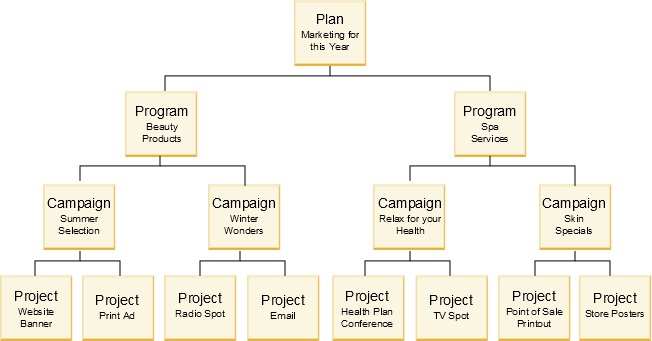
The following diagram shows an example hierarchy of a plan that contains two programs. Each program contains two campaigns, and each campaign contains two projects. You can choose as much or as little hierarchy as your organization needs.