subscribe iconSubscribe to this information

Attaching the rack to the concrete floor beneath a raised floor

You might need to attach the rack to the floor. Use the procedure in this section to perform this task.

Obtain the services of a mechanical contractor to attach the rack-mounting plates to the concrete floor. The mechanical contractor needs to determine that the hardware being used to secure the rack-mounting plates to the concrete floor is sufficient to meet the requirements for the installation.

To attach the rack to a concrete floor beneath a raised floor, do the following:
  1. Put your rack in its predetermined location and tighten the locking screws on the casters.
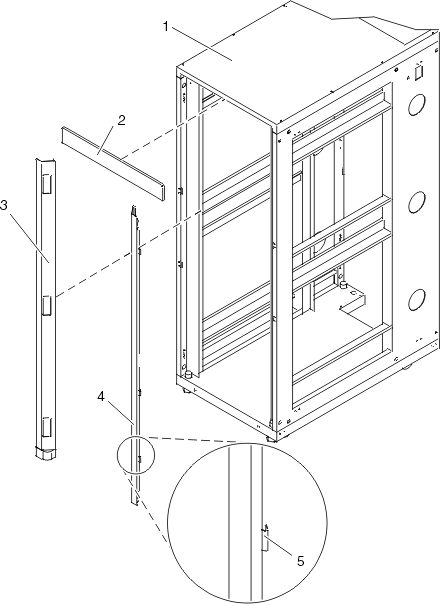
  2. If installed, remove the top, left and right trim panels. The trim panels are held in place with spring clips. See the following illustration.
    removing the trim panels
    1 Rack chassis 4 Right-side trim panel
    2 Top trim panel 5 Spring clip
    3 Left-side trim panel    
    Figure 1. Removing the trim panels.
  3. If installed, remove the front and rear doors. To remove a rack door, go to Attaching the rack doors. After the rack doors have been removed, go to the next substep.
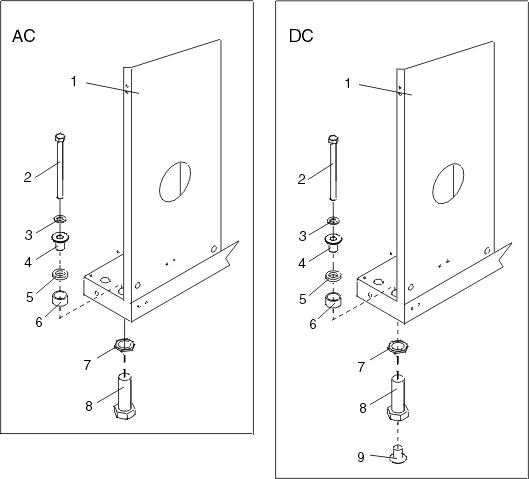
  4. Locate the hardware mounting kit and the two mounting plates. Refer to the following illustration when reviewing the contents of the hardware mounting kit. The hardware mounting kit contains the following:
    • Four rack-mounting bolts
    • Four thin washers
    • Eight plastic isolator bushings
    • Four thick washers
    • Four spacers
  5. If you are installing a dc-powered rack, insert each bushing into a leveling foot as shown in the following illustration. On a dc-powered rack, do not remove the lower plastic isolator bushings from the leveling feet.
    Note: If you are installing an ac-powered rack, temporarily install the lower plastic isolator bushings to help you locate the rack-mounting plate. After the mounting plate has been correctly located, remove the lower plastic isolator bushings.
    Figure 2. Installing the ac and dc power-mounting plates.
    installing the AC and DC power-mounting plates
    1 Rack chassis 7 Jam nut
    2 Rack-mounting bolt 8 Leveling foot
    3 Thin washer 9 Lower plastic isolator bushing (used only on dc powered systems)
    4 Top plastic isolator bushing AC Typical leveling foot installation for an ac-powered rack
    5 Thick washer DC Typical leveling foot installation for an dc-powered rack
    6 Spacer    
  6. Position the two mounting plates in the approximate mounting location under the rack.
  7. Create a rack-mounting bolt assembly by adding the following items, in the order listed, to each rack-mounting bolt.
    1. Thin flat washer
    2. Top plastic isolator bushing
    3. Thick flat washer
    4. Spacer
  8. Insert a rack-mounting bolt assembly through each of the leveling feet.
  9. Reposition the rack-mounting plates under the four rack-mounting bolts so that the mounting bolts are centered directly over the threaded bolt holes.
  10. Turn the rack-mounting bolts four complete turns into the mounting plate's threaded bolt holes.
  11. Mark the raised-floor panel around the edges of front and back rack-mounting plates.
  12. Mark the plate bolt-down holes that are accessible through the opening in the back of the rack.
  13. Remove the rack-mounting bolt assemblies.
  14. If you are installing an ac-powered rack, remove the bottom isolator bushing from each of the leveling feet. If you are installing a dc-powered rack, the bottom isolator bushings must remain installed in each of the leveling feet.
  15. Remove the rack-mounting plates from the marked locations.
  16. Loosen each of the locking screws on the casters.
  17. Move the rack so that it is clear of both areas that were marked on the floor for the rack-mounting plate locations.
  18. Reposition the mounting plates within the marked areas.
  19. Mark the raised-floor panel at the center of each hole in the rack-mounting plates (including the tapped holes).
  20. Remove the two rack-mounting plates from the marked locations on the raised floor panel.
  21. Drill two clearance holes on each end of each rack-mounting plate. The drilled holes should be approximately 1-inch deep. This will accommodate any rack-mounting bolt extending past the rack-mounting plate when securing the rack to the rack-mounting plate.
  22. For each rack-mounting plate, select at least two suitable hole locations. Select the hole locations as close to the threaded hole areas as possible. Be sure the hole locations selected at the back of the rack are accessible.
  23. Drill pass-through holes in the raised-floor panel. The pass-through holes allow the anchor bolts to be inserted into the rack-mounting plate and pass through the raised floor panel to the concrete floor.
    Note: You must use a minimum of two anchor bolts for each rack-mounting plate to securely attach the rack-mounting plate through the raised-floor panel to the concrete floor. Because some of the holes in each rack-mounting plate may align with concrete reinforcement rods imbedded in the concrete, some of the rack-mounting plate holes may not be usable.
  24. Transfer the locations of the anchor bolt holes (exclude the clearance holes drilled for the rack-mounting bolts ) from the raised-floor panel to the concrete floor directly beneath, and mark the hole locations on the concrete floor.
  25. Drill holes in the concrete floor to secure the anchor bolts.
  26. Position the raised-floor panel back into position over the anchor bolt holes.
  27. Position the front stabilizer bracket within the marked area on the raised-floor panel.
  28. Using your anchor bolts, secure the front stabilizer brackets on top of the raised floor and through to the concrete floor.
  29. Position the rear stabilizer brackets within the marked area on the raised-floor panel.
    securing the rack to the floor
    1 Rack-mounting bolt 7 Leveling foot
    2 Thin washer 8 Lower plastic isolator bushing (used only on dc-powered systems)
    3 Top plastic isolator bushing 9 Stabilizer brackets
    4 Thick washer 10 Threaded hole (used to secure the rack to mounting plate.)
    5 Spacer 11 Anchor bolt hole
    6 Jam nut 12 Traced pattern (pattern to be traced onto the floor using the mounting plate as a template)
    Figure 3. Securing the rack to the floor.
  30. Using your anchor bolts, secure the back stabilizer bracket on top of the raised floor and through to the concrete floor.
  31. Replace all raised-floor panels that may have been removed when aligning and securing the anchor bolts to the concrete floor.
  32. Align the rack over the front and back stabilizer brackets.
  33. Insert each of the bolt assemblies through a leveling foot.
  34. Align the rack-mounting bolts with the threaded holes in each stabilizer bracket. Turn each bolt three to four rotations.
  35. Tighten the locking screw on each caster.
  36. Adjust the leveling feet downward as needed until the rack is level. When the rack is level, tighten the jam nuts against the base of the rack.
  37. If you have multiple racks that are connected as a suite (bolted to each other), go to Connecting multiple racks with rack-to-rack attachment kit. Otherwise, torque the four bolts to 40-50 ft-lbs (54-67 nm).
  38. If you are not installing doors on your rack, install the top, left, and right trim panel.
  39. Connect the power distribution system as described in Connecting the power distribution system.
  40. After the rack is bolted down and you are going to attach a front electrical outlet, go to Attaching the front or back ac electrical outlet.
  41. If you are not going to attach a front electrical outlet and you are installing rack doors, go to Attaching the rack doors.

Next topic: Connecting the power distribution system.


Send feedback | Rate this page

Last updated: Fri, Oct 30, 2009