subscribe iconSubscribe to this information

Installing the system unit on the rail assembly

You might need to install the system on the rail assembly. Use the procedure in this section to perform this task.

Before installing the 7037-A50 system unit on the rail assembly, ensure that the stabilizers are extended and the stabilizer plate is attached to the bottom front of the rack to prevent the rack from falling forward when the rails are pulled out of the rack. Refer to Install the rack.

To install the 7037-A50 on the rail assembly, complete the following steps:

  1. The optional latch brackets may be preinstalled. If the latch brackets are not preinstalled and you want to install them, see Installing or removing a rack-mounted system-unit latch bracket and return to this section.
  2. Ensure that the four blue rack-support wheels A are securely installed on the side of the system. videovideo
    Figure 1. Rack-support wheels.
    rack support wheels
  3. Fully extend the slide rails out of the rack.
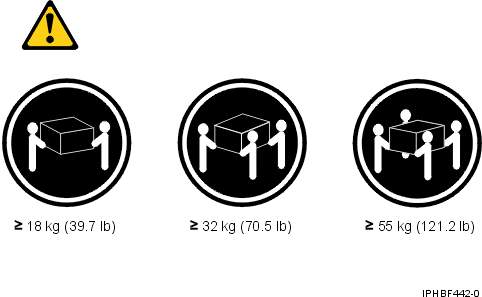
  4. Using at least two people, lift the system above the rails and rest the system on the rack-support wheels A on the rails.
    lift cautions
  5. Carefully slide the system to align the screw holes on the slide rails with the system chassis.
    Note: The front hole of the rail will align with the first hole in the system chassis.
  6. Attach four M4 screws C on each side of the system to secure the system to the rails.
    Figure 2. Securing the system to the rails and removing the rack-support wheels.
    Securing the system to the rails and removing the rack-support wheels
  7. Remove the four blue rack-support wheels B.
    CAUTION:
    Ensure that all eight screws are securely attached through the rail and into the system before removing the rack-support wheels. If the screws have not been inserted, the system may fall when the rack-support wheels are removed.
  8. Using two M4 screws, install the cable bracket restraint D on the back left-side of the system.
    Note: The bracket will face and be bent slightly outward.
    Figure 3. Securing the system to the rails and removing the rack-support wheels.
    installing the cable bracket restraint and cable restraint
  9. Install the cable clamp E on the back of the system.
  10. Attach and route the cables.
  11. Simultaneously depress the safety latches, located on both sides of the rails F in Figure 4 and push the system unit into the rack.
    Figure 4. Press the safety latches and push the system unit into the rack.
    pressing the safety latches and pushing the system into the rack
  12. Slide the system drawer in and out of the rack two or three times. This action aligns the system drawer with the rails.
  13. Push the system drawer back into the rack. Using a screwdriver, tighten the rail-retaining screws that secure the slide rails to the rack's rear flange on each side of the rack.
  14. Slide the system drawer about halfway out of the rack.
  15. Using a screwdriver or similar tool, tighten the front rail-retaining screws that secure the slide rails to the rack's front flange on each side of the rack.
    Note: After the system rails are installed, do not extend them past their safety latches. The safety release latches stop the rails from overextending and separating. This action prevents the system drawer from being accidentally pulled out too far and dropped.
    Attention: If any binding is detected, loosen the rail-retaining screws (front and back), and repeat steps 11 through 15.
  16. When transporting the rack, fasten the system drawer to the rack enclosure by inserting the transport retaining screw I through the bezel and latch bracket H, and screwing it to the rack and second optional screw G that prevents the rail from sliding as shown in Figure 5.
    Figure 5. Transport retaining screws.
    transport retaining screws

Send feedback | Rate this page

Last updated: Fri, Oct 30, 2009