You might need to remove and replace a side panel on the rack.
Use the procedures in this section to perform this task.
The 7014-S25 standard
racks come with side panels installed. Remove the side panels from a rack
before you install or remove optional devices.
- Unlock the side panels by pressing out on both locking latches
to release the latches.
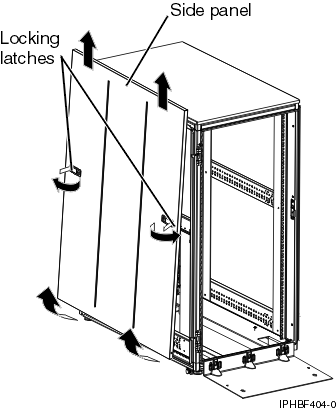
Figure 1. Removing the side panel.
- Tilt the bottom of the side panel slightly toward you.
- Lift the side panel away from the ridge on the top of the rack.
- Repeat this procedure for the other side panel.
 Subscribe to this information
