You might need to open the service access panel to perform service
on the fans, control panel, or to access other internal components. Use the
procedure in this section to perform this task.
To open the service access panel on a rack-mounted model 505 follow these steps:
- If necessary, open the front rack door.
- If they are present, remove the two thumbscrews A that
secure the system unit to the rack as shown in the following figure.
Figure 1. Remove thumbscrews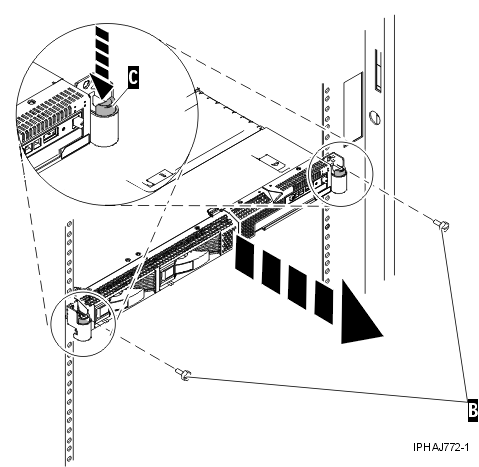
- Release the rack latches B on both the left
and right sides as shown in the previous figure.
Note: - Ensure that the cables at the rear of the system unit do not catch or
bind as you pull the unit out from the rack.
- When the rails are fully extended, the rail safety latches lock into place.
This action prevents the system unit from being pulled out too far.
- Slowly pull the system unit out from the rack until the service
access panel is completely exposed.
- Push the panel release tabs A until you
can open the panel lid, as shown in the following figure.
- Lift the panel lid B to its fully opened
position.
Figure 2. Open the service access panel 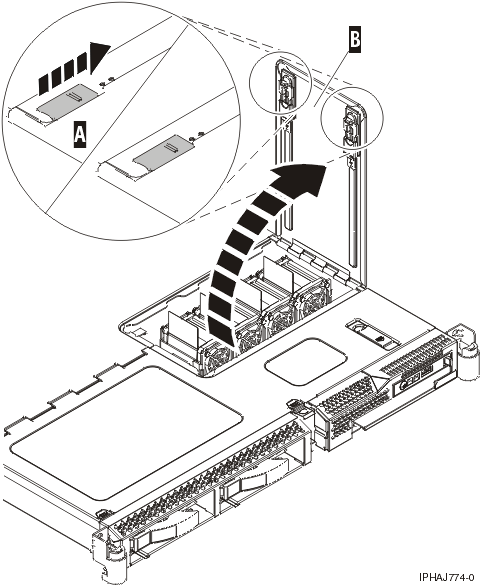
Complete the following steps to close the service access panel:
- Close the panel lid A, as shown in the following
figure.
Figure 3. Close the service access panel
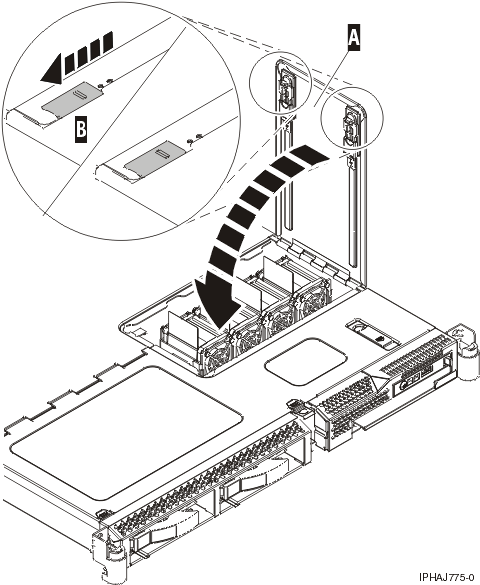
- Push the panel release tabs B back into the locked
position.
- Gently push the server back into the rack until the rack latches lock
into place.
- Replace the thumbscrews if necessary.
 Subscribe to this information