This function allows you to place the system fault-indicator LED in remind mode on the 7037-A50 server and the 7047-185 workstation.
This function is available in both normal and manual operating mode.
When the system fault-indicator LED is on solid, an error condition exists on the system. If you want to defer the repair of the error, you can place the system fault-indicator LED in remind mode. Placing the system in remind mode causes the system fault-indicator LED to flash instead of being on solid. The remind mode lets you know that a system fault that you have deferred still exists on the system. If any other serviceable event occurs on the system, the remind mode is changed back to system fault mode, where the LED is on solid.
| Function/Data | Action or description |
|---|---|
0 5 _ _ _ _ _ _ _ _ _ _ _ _ _ _ _ _ _ _ _ _ _ _ _ _ _ _ _ _ _ _ |
Use the Increment or Decrement buttons to scroll to function 05. |
R E M I N D M O D E O N _ _ _ _ _ _ _ _ _ _ _ _ _ _ _ _ _ |
Press Enter to start function 05. Valid options
are:
|
R E M I N D M O D E O F F _ _ _ _ _ _ _ _ _ _ _ _ _ _ _ _ _ |
Press Enter to toggle the option on or off. |
0 5 _ _ _ _ _ _ _ _ _ _ _ _ _ _ _ _ _ _ _ _ _ _ _ _ _ _ _ _ _ _ |
Use the Increment or Decrement buttons to scroll through the control panel functions. |
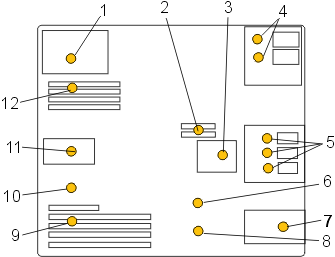
| 1 | Power supply fault-indicator LED | 7 | Front fan fault-indicator LED |
| 2 | Voltage-regulator module fault-indicator LED | 8 | Battery fault-indicator LED |
| 3 | Disk-drive bay fan fault-indicator LED | 9 | PCI adapter fault-indicator LED |
| 4 | Optical-media bay fault-indicator LEDs | 10 | Thermal fault-indicator LED |
| 5 | Disk-drive bay fault-indicator LEDs | 11 | Rear fan fault-indicator LED |
| 6 | System backplane fault-indicator LED | 12 | Memory fault-indicator LED |
 Subscribe to this information