subscribe iconSubscribe to this information

Scenario: Configuring a Virtual I/O Server using VLAN tagging

Use this scenario to help you become familiar with creating a network using VLAN tagging.

Situation

You are the system administrator responsible for planning and configuring the network in an environment with the Virtual I/O Server running. You would like to configure the network so that two logical subnets exist, with some partitions on each subnet.

Objective

The objective of this scenario is to configure multiple networks to share a single physical Ethernet adapter. Systems on the same subnet are required to be on the same VLAN and therefore have the same VLAN ID, which allows communication without having to go through the router. The separation in the subnets is achieved by ensuring that the systems on the two subnets have different VLAN IDs.

Prerequisites and assumptions

You cannot use VLAN in an Integrated Virtualization Manager environment.

Configuration steps

The following figure shows the configuration that will be completed during this scenario.
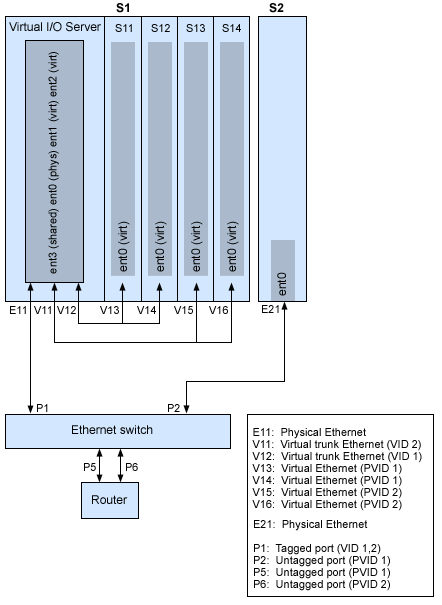
An illustration of the relationship among the physical Ethernet, virtual Ethernet, and Ethernet switch ports for a VLAN network configuration.

Using the preceding figure as a guide, follow these steps.

  1. Set up the Ethernet switch ports as follows:
    • P1: Tagged port (VID 1, 2)
    • P2: Untagged port (PVID 1)
    • P5: Untagged port (PVID 1)
    • P6: Untagged port (PVID 2)

    For instructions on configuring the ports, see the documentation for your switch.

  2. For system S1, use the HMC to create virtual Ethernet adapters for the Virtual I/O Server:
    • Create virtual Ethernet adapter V11 for the Virtual I/O Server with the trunk setting selected and VID set to 2. Specify an unused PVID value. This value is required, even though it will not be used.
    • Create virtual Ethernet adapter V12 for the Virtual I/O Server with the trunk setting selected and VID set to 1. Specify an unused PVID value. This value is required, even though it will not be used.
  3. For system S1, use the HMC to create virtual Ethernet adapters for other partitions:
    • Create virtual adapters V13 and V14 for partitions S11 and S12, respectively, with PVID set to 2 and no additional VIDs.
    • Create virtual adapters V15 and V16 for partitions S13 and S14, respectively, with PVID set to 1 and no additional VIDs.
  4. For system S1, use the HMC to assign the physical Ethernet adapter (E11) to the Virtual I/O Server and connect the adapter to the Ethernet switch port P1.
  5. Using the Virtual I/O Server command-line interface, set up a Shared Ethernet Adapter ent3 with the physical adapter ent0 and virtual adapters ent1 and ent2.
  6. Configure IP addresses for the following:
    • S13 (en0), S14 (en0), and S2 (en0) belong to VLAN 1 and are on the same subnet. The router is connected to Ethernet switch port P5.
    • S11 (en0) and S12 (en0) belong to VLAN 2 and are on the same subnet. The router is connected to Ethernet switch port P6.

You can configure the Shared Ethernet Adapter on the Virtual I/O Server partition with an IP address. This is required only for network connectivity to the Virtual I/O Server.

As the tagged VLAN network is being used, you must define additional VLAN devices over the Shared Ethernet Adapters before configuring IP addresses.


Send feedback | Rate this page

Last updated: Fri, Oct 30, 2009