Use this article to help you become familiar with typical Shared Ethernet Adapter failover scenario.
You are the system administrator responsible for planning and configuring the network in an environment with the Virtual I/O Server running. You want to provide higher network availability to the client logical partition on the system. This can be accomplished by configuring a backup Shared Ethernet Adapter in a different Virtual I/O Server partition.
The objective of this scenario is to configure primary and backup Shared Ethernet Adapters in the Virtual I/O Server logical partitions so that network connectivity in the client partitions will not be lost in the case of adapter failure.
You cannot use the Integrated Virtualization Manager with multiple Virtual I/O Server partitions on the same server.
The following image depicts a configuration where the Shared Ethernet Adapter failover feature is set up. The client partitions H1 and H2 are accessing the physical network using the Shared Ethernet Adapters, which are the primary adapters. The virtual Ethernet adapters used in the shared Ethernet setup are configured with the same VLAN membership information (PVID, VID), but have different priorities. A dedicated virtual network forms the control channel and is required to facilitate communication between the primary and backup shared Ethernet device.
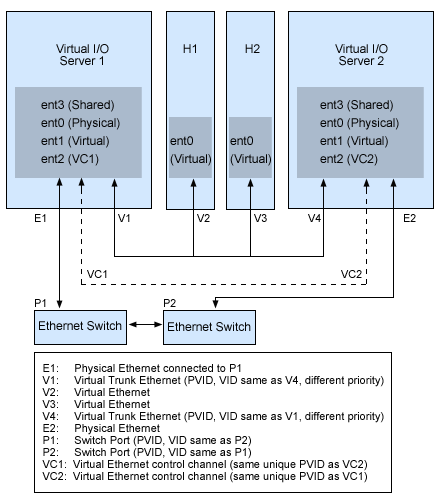
Using the preceding figure as a guide, follow these steps:
 Subscribe to this information