Some adapters must be placed in specific PCI slots to function correctly or perform optimally. Use this information to determine where to install PCI adapters.
System unit back view
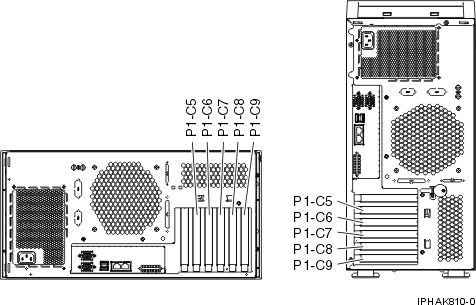
The model 7047-185 or 7037-A50 has 4 PCI-X slots, and 1 PCI slot, and supports a total of 5 PCI/PCI-X adapters. The following table describes the PCI/PCI-X slots:
| PHB0 | PHB1 | PHB2 | PHB3 | PHB4 | ||||
| Slot 1 (P1-C5) | Integrated IDE | Integrated USB (2) | Slot 2 (P1-C6) | Integrated Dual 1 Gb Ethernet | Integrated SCSI U320 | Slot 3 (P1-C7) | Slot 4 (P1-C8) | Slot 5 (P1-C9) |
| Short | Long | Long | Long | Long | ||||
| 32-bit 3.3V, 33 MHz | 64-bit 3.3V, 133 MHz | 100 MHz | 100 MHz | 64-bit 3.3V, 133 MHz | 64-bit 3.3V, 100 MHz | 64-bit 3.3V, 100 or 133* MHz | ||
PCI Host Bridge (PHB) descriptions
See the following table to identify the recommended system unit slot placement and maximum number of specified adapters recommended. For more information about the adapters that are listed, see IBM System p5 and eServer p5 PCI and PCI-X adapters.
| Feature code | Base unit slot priority | Maximum number of adapters allowed | |
| 7037-A50 | 7047-185 | ||
| 2842 1 | 2, 3 | NA | 2 |
| 2843 1 | 2 | NA | 1 |
| 1954 * | 2, 3 | 2 | 2 |
| 5740 * | 2, 3 | 2 | 2 |
| 1984 * | 2, 3, 5/4 | 3 | 3 |
| 5706 * | 2, 3, 5/4 | 3 | 3 |
| 5707 * | 2, 3, 5/4 | 3 | 3 |
| 1983 * | 2, 3, 5/4 | 3 | 3 |
| 1978 * | 2, 3, 5, 4 | 4 | 4 |
| 1979 * | 2, 3, 5, 4 | 4 | 4 |
| 5700 * | 2, 3, 5, 4 | 4 | 4 |
| 5701* | 2, 3, 5, 4 | 4 | 4 |
| 5759** | 2, 3, 5, 4 | 3 | 3 |
| 1910** | 2, 3, 5, 4 | 3 | 3 |
| 1905* | 2, 3, 5, 4 | 4 | 4 |
| 5758* | 2, 3, 5, 4 | 4 | 4 |
| 1986 * | 2, 3, 5, 4 | 3 | 3 |
| 1987* | 2, 3, 5, 4 | 3 | 3 |
| 5713 * | 2, 3, 5, 4 | 3 | 3 |
| 5714* | 2, 3, 5, 4 | 3 | 3 |
| 1977 * | 2, 3, 5, 4 | 3 | 1 |
| 5716 * | 2, 3, 5, 4 | 3 | 1 |
| 1912* | 2, 3, 5, 4, 1 | 4 | 4 |
| 5736* | 2, 3, 5, 4, 1 | 4 | 4 |
| 1913* | 2, 3, 5, 4 | 4 | 4 |
| 5737* | 2, 3, 5, 4 | 4 | 4 |
| 1980 | 2, 3, 4, 5 | 2 | 4 |
| 2849 | 2, 3, 4, 5 | 2 | 4 |
| 2947 | 4, 5, 3, 2 | 3 | 3 |
| 5723 | 1, 4, 5, 3, 2 | 2 | 2 |
| 2943 | 1, 4, 5, 3, 2 | 2 | 2 |
** Extra-high bandwidth (EHB) adapter. See the Performance notes before installing this adapter. * High bandwidth (HB) adapter. See the Performance notes before installing this adapter. 1 This feature is only for the 7047-185 |
|||
Performance notes (for optimum performance)
 Subscribe to this information