Moving a rack cabinet
Learn how to move a rack cabinet between locations.
Before you begin
Before you move the rack cabinet to another location, ensure that you have read the guidelines provided.
When you move a rack cabinet, observe the following safety guidelines.
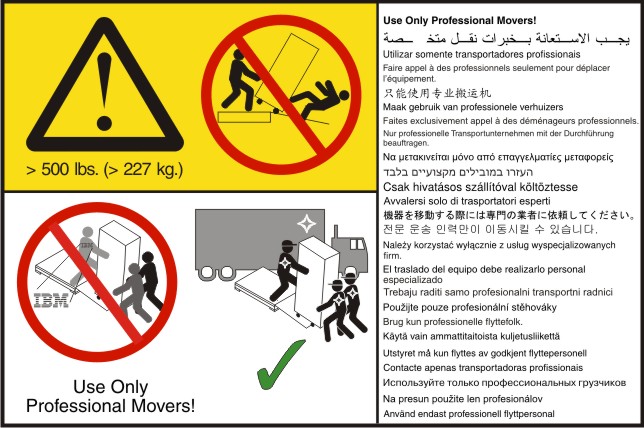


- Plug power cords from devices in the rack cabinet into electrical outlets that are located near the rack cabinet and are easily accessible.
- Each rack cabinet might have more than one power cord. Be sure to disconnect all power cords in the rack cabinet before servicing any device in the rack cabinet.
- Install an emergency-power-off switch if more than one power device (power distribution unit or uninterruptible power supply) is installed in the same rack cabinet.
- Connect all devices installed in a rack cabinet to power devices installed in the same rack cabinet. Do not plug a power cord from a device installed in one rack cabinet into a power device installed in a different rack cabinet.

- Reduce the weight of the rack cabinet by removing equipment starting at the top of the rack
cabinet. When possible, restore the rack cabinet to the configuration of the rack cabinet as you
received it. If this configuration is not known, you must do the following:
- Remove all devices in the 22U position and above.
- Ensure that the heaviest devices are installed in the bottom of the rack cabinet.
- Ensure that there are no empty U-levels between devices installed in the rack cabinet below the 22U level.
- If the rack cabinet you are relocating is part of a suite of rack cabinets, detach the rack cabinet from the suite.
- Inspect the route that you plan to take to eliminate potential hazards.
- Verify that the route that you choose can support the weight of the loaded rack cabinet. Refer to the documentation that comes with your rack cabinet for the weight of a loaded rack cabinet.
- Verify that all door openings are at least 760 x 2083 mm (30 x 82 in.)
- Ensure that all devices, shelves, drawers, doors, and cables are secure.
- Ensure that the four leveling pads are raised to their highest position.
- Ensure that there is no stabilizer bracket installed on the rack cabinet.
- Do not use a ramp inclined at more than ten degrees.
- Once the rack cabinet is in the new location, do the following:
- Lower the four leveling pads.
- Install stabilizer brackets on the rack cabinet.
- If you removed any devices from the rack cabinet, repopulate the rack cabinet from the lowest position to the highest position.
If a long distance relocation is required, restore the rack cabinet to the configuration of the rack cabinet as you received it. Pack the rack cabinet in the original packaging material, or equivalent. Also, lower the leveling pads to raise the casters off of the pallet and strap the rack cabinet to the pallet.
Make sure that a load of 75 kg (165 lb) or more is placed at the bottom of a configured rack that is not bolted to the floor.
Procedure
To move the rack cabinet to another location, complete the following general steps:
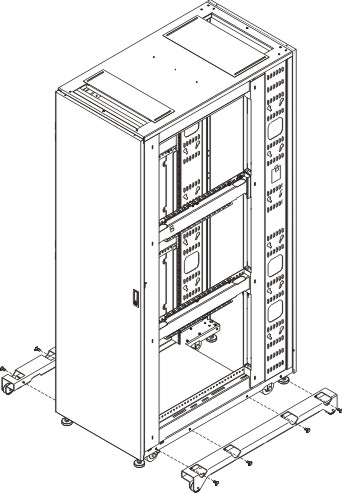
- Install the outriggers on both sides of the rack cabinet.
DANGERAlways relocate the rack cabinet with the outriggers installed. Keep the outriggers and install them if you need to move the rack to another location in the future.
Use the 6 mm hex wrench that comes in the hardware kit to install the four bolts that attach each outrigger to the rack cabinet. Ensure that you tighten the bolts securely.
Figure 1. Installing the outriggers