Installing slide rails into the rack
Learn how to install slide rails into the rack.
To install the slide rails into the rack, complete the following steps:
- Insert the right
slide rail (A), which is marked right,
into the rack mounting flange (B) locations,
on the rear right side of the rack. The two rail pins will protrude
through the bottom and middle holes (B) on
the EIA unit.
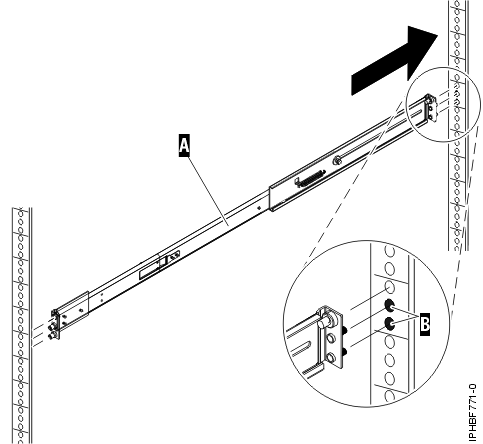 Figure 1. Installing the right slide rail into the rear of the rack
 - Push on the end
of the rail (A) to compress the rail's spring-loaded
mechanism, and insert the rail into the mounting flange (B) locations,
on the right side of the rack. The rail will decompress and the two
rail pins will protrude through the bottom and middle holes (B) on
the EIA unit.
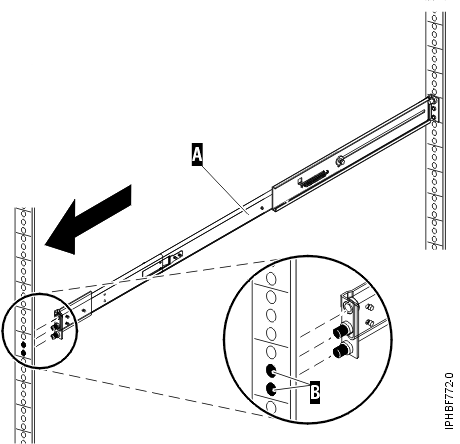 Figure 2. Installing the right slide rail into the front of the rack
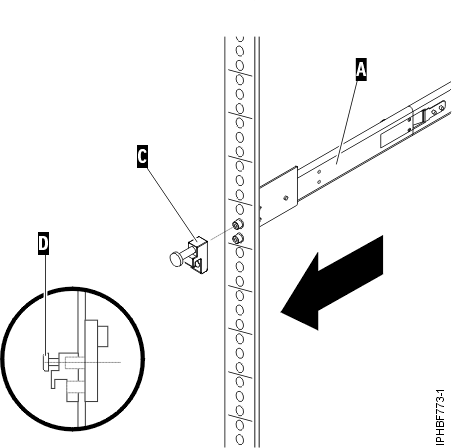
 - From the front of the rack, place the latch strike (C) over
the pins. Finger-tighten the captive screw (D) into
the top pin in the front of the right slide rail (A). Figure 3. Installing the latch strike to the front of the rails
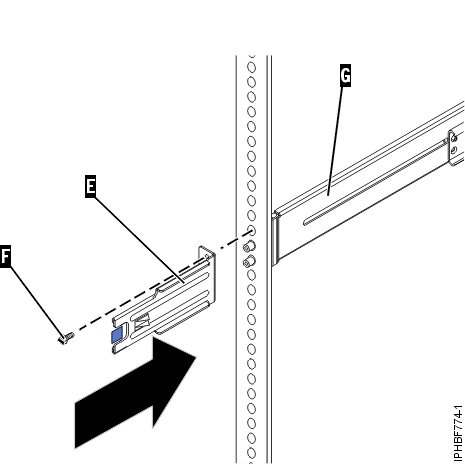
- Move to the rear of the rack. Finger-tighten screw (F) to
attach the cable-management arm mounting bracket (E) to
the rear of the left rail (G). Figure 4. Attaching the cable-management bracket to the rear-left rail
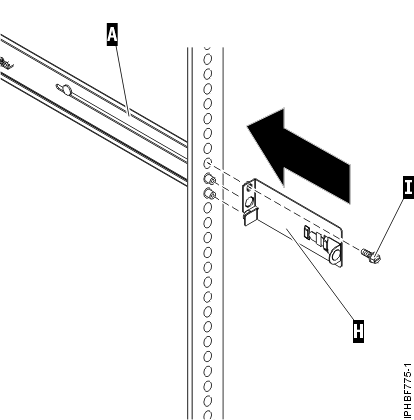
- If you do not plan to transport this system, continue
with Installing the HMC on the slide rails. If you
plan to transport this system, insert screw (I) to
attach the cable-management arm support bracket (H) to
the rear right side of the rail (A). Finger-tighten
the screw.
The support bracket of the cable-management arm can be used to secure the cable-management arm during transportation. If the mechanism is engaged after the cable-management arm is installed, you will not be able to slide the system from the rack.
Figure 5. Attaching the support bracket of the cable-management to the rear-right rail.