Learn how to remove the shipping bracket that is used to brace the preinstalled enclosure.
There are three parts in the bracket assembly that is used to stabilize the 5887 disk drive enclosure during shipment of the rack that contains the enclosure. The bracket assembly consists of a large bracket that attaches to the rack frame and two smaller brackets that secure the two enclosure services manager (ESM) units.
Prerequisite: A medium size screwdriver is required to complete this
task.
To remove the shipping bracket,
complete the following steps:- Attach the electrostatic discharge (ESD) wrist strap.Attention:
- Attach an electrostatic discharge (ESD) wrist strap to an unpainted metal surface of your hardware to prevent the electrostatic discharge from damaging your hardware.
- When using an ESD wrist strap, follow all electrical safety procedures. An ESD wrist strap is used for static control. It does not increase or decrease your risk of receiving electric shock when using or working on electrical equipment.
- If you do not have an ESD wrist strap, just prior to removing the product from ESD packaging and installing or replacing hardware, touch an unpainted metal surface of the system for a minimum of 5 seconds.
- To clear the shipping bracket
installation area of cables and cords, complete the following steps:
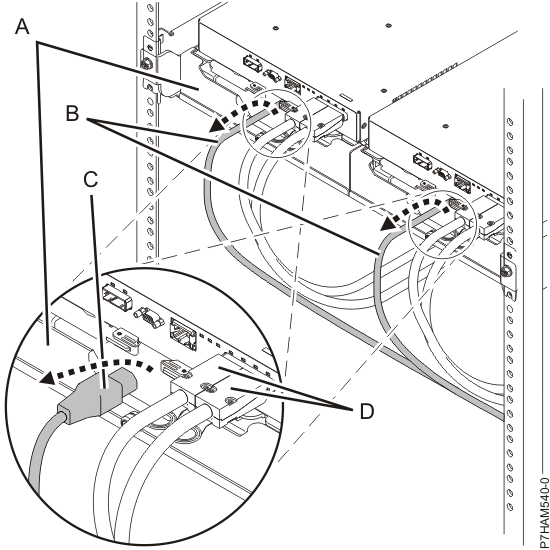
- Find the slotted opening in the small front bracket (A) below the left enclosure services manager (ESM) and loosen the power supply cord (B) that is visible in the opening.
- Carefully pull up the power supply cord through the small front bracket opening.
- After you remove the connector end of the power cord from the opening (C), hang the loose length of cable to one side so that it does not interfere with your workspace in the shipping bracket installation area.
- Using the same technique, remove and hang the right power supply
cord. Do not disconnect or detach the power supply cords from their
attachments to the rack or to other cables.Figure 1. Removing the power supply cords from their shipping position
- To remove the small and large
brackets, complete the following steps:
- Loosen the two thumbscrews (A) on the small
front brackets below the ESM units. Remove the brackets by lifting
them up and away from the ESM units.Figure 2. Removing the small front brackets

- Using a screwdriver, remove the screw
that attaches the large bracket to the left flange of the rack frame.
Then, remove the screw that attaches the bracket to right flange.Note: Keep the screws that you remove for later in the procedure.Figure 3. Removing the screws from the bracket and rack flanges

- Slide the large bracket toward the rear of the rack. Lift the
bracket with two hands to remove it from the side rails.Tip: Save all of the brackets that you remove for future reinstallation and for shipping of the enclosure that might be required.Figure 4. Removing the shipping bracket

- Reinstall the screws that you removed by inserting them into the same holes in the rack frame and side rails from which you removed them. Tighten the screws with a screwdriver.
- Loosen the two thumbscrews (A) on the small
front brackets below the ESM units. Remove the brackets by lifting
them up and away from the ESM units.
- To dock and secure the ESM
units, complete the following steps:
- Moving one ESM at a time, slide the unit approximately 75 mm (3 in) toward the chassis.
- For one ESM at a time, place your forefingers under the release
levers and pinch the terracotta lever tips. Release the levers and
swing them into their fully open position.Figure 5. Opening the ESM release levers

- Moving one ESM at a time, slide the unit into the chassis until
it stops.Figure 6. Docking the ESM units

- For one ESM at a time, place your thumbs on the tips of the terracotta
ESM levers and swing the levers into their fully closed and latched
position.Figure 7. Closing the ESM release levers

- To dock and secure the
power supplies, complete the following steps:
- Moving one power supply at a time, slide the unit approximately
75 mm (3 in) away from the chassis.Figure 8. Sliding the power supplies toward the chassis

- For one power supply at a time, rest your right thumb on the terracotta
release latch beside the unit handle and your fingertips on the handle.
In one motion, squeeze the release latch to the right and swing the
handle down into its fully open position.Figure 9. Opening the power supply release handle

- Moving one power supply at a time, slide the unit into the chassis
until it stops.Figure 10. Docking the power supplies

- Moving one power supply at a time, swing the unit handle up and
into its fully closed position on the release latch.Figure 11. Closing the power supply release handle

- Moving one power supply at a time, slide the unit approximately
75 mm (3 in) away from the chassis.
